Netty核心源码解析与应用
Netty线程模型图
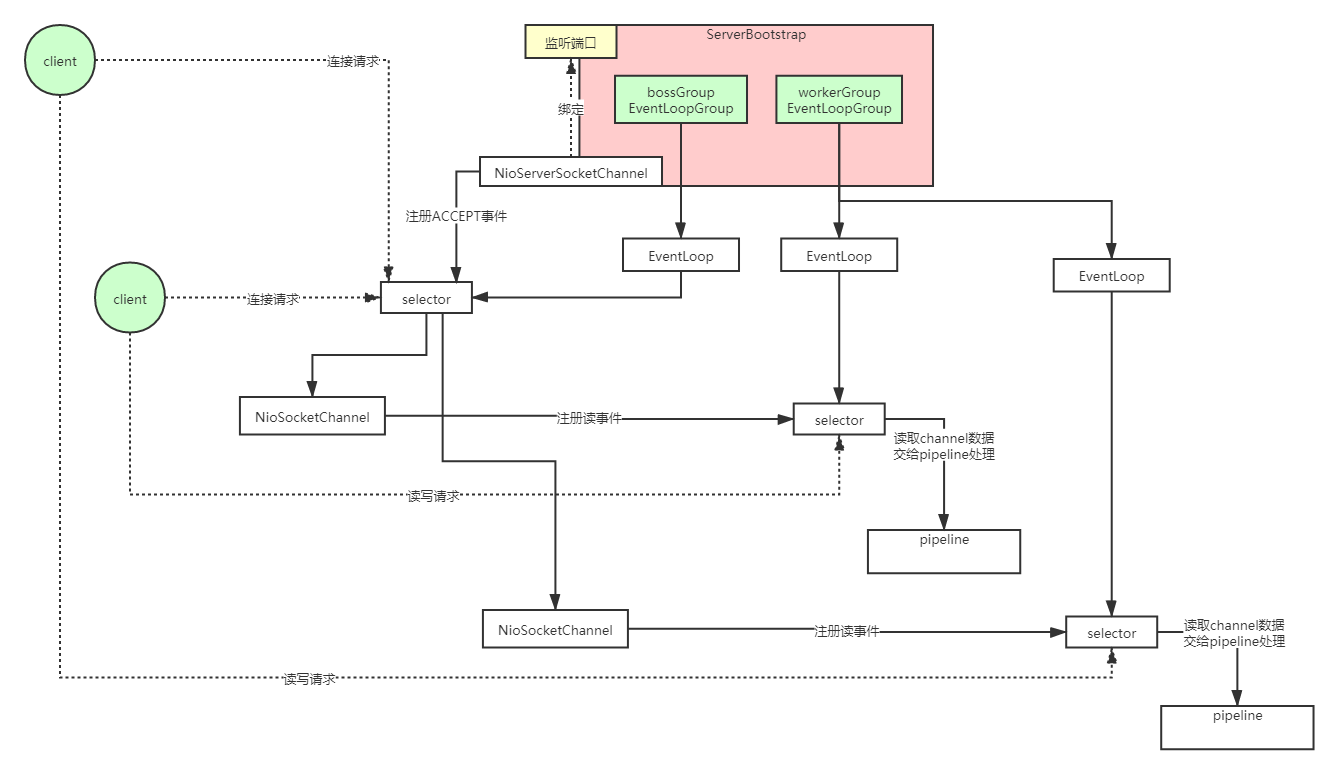
Netty线程模型源码剖析图
参考文档
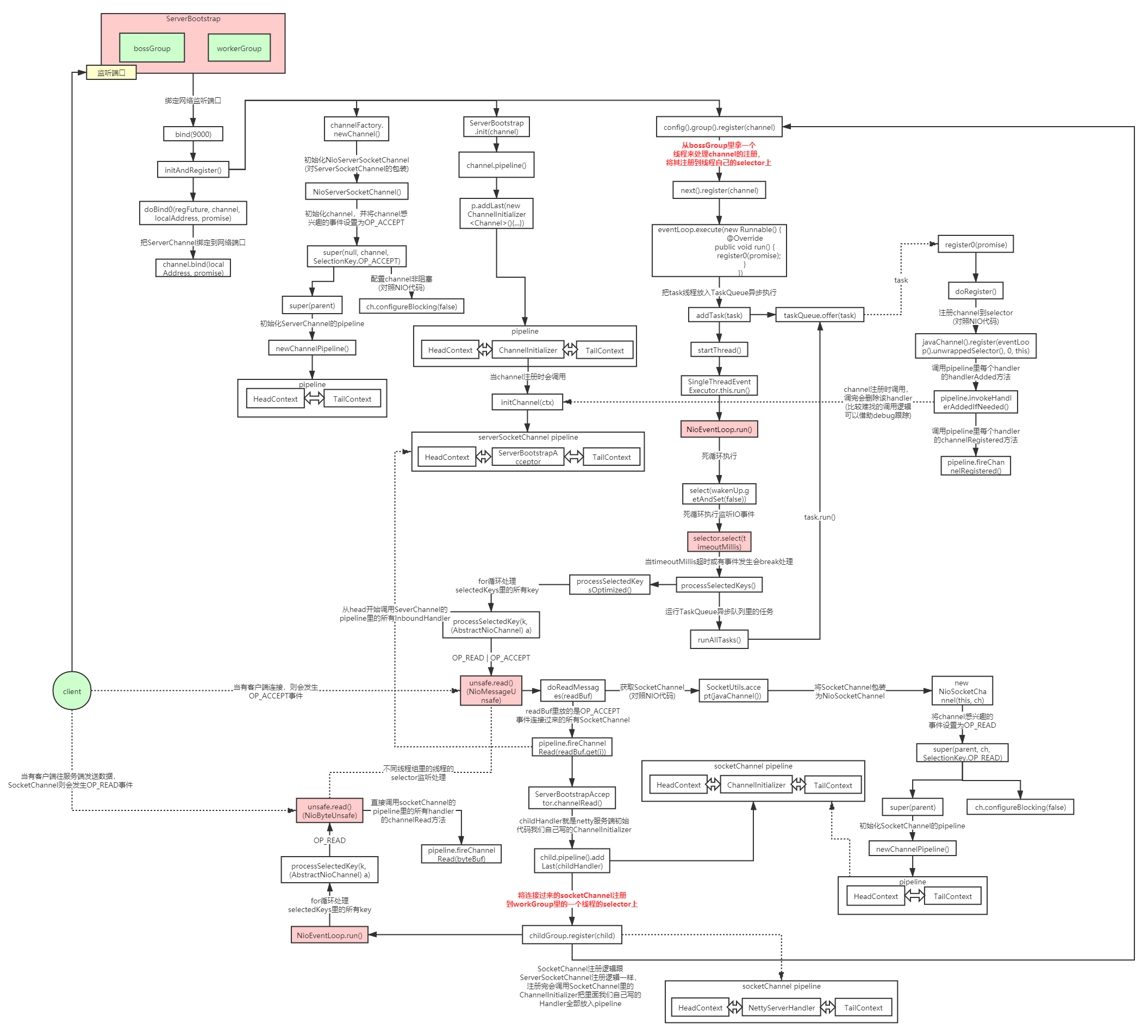
具体深入源码,后续深入学习时分析
Netty高并发高性能架构设计精髓
- 主从Reactor线程模型
- bossGroup负责接收连接,workerGroup负责读写,大大提升了Netty的并发能力和性能
- NIO多路复用非阻塞
- 无锁串行化设计思想
- 各个worker线程都是串行化运行,减少线程切换带来的损耗
- 支持高性能序列化协议
- 零拷贝(直接内存的使用)
- ByteBuf内存池设计
- 灵活的TCP参数配置能力
- 并发优化
无锁串行化设计
在大多数场景下,并行多线程处理可以提升系统的并发性能。但是,如果对于共享资源的并发访问处理不当,会带来严重的锁竞争,这最终会导致性能的下降。为了尽可能的避免锁竞争带来的性能损耗,可以通过串行化设计,即消息的处理尽可能在同一个线程内完成,期间不进行线程切换,这样就避免了多线程竞争和同步锁。NIO的多路复用就是一种无锁串行化的设计思想(理解下Redis和Netty的线程模型)
为了尽可能提升性能,Netty采用了串行无锁化设计,在IO线程内部进行串行操作,避免多线程竞争导致的性能下降。表面上看,串行化设计似乎CPU利用率不高,并发程度不够。但是,通过调整NIO线程池的线程参数,可以同时启动多个串行化的线程并行运行,这种局部无锁化的串行线程设计相比一个队列-多个工作线程模型性能更优。
Netty的NioEventLoop读取到消息之后,直接调用ChannelPipeline的fireChannelRead(Object msg),只要用户不主动切换线程,一直会由NioEventLoop调用到用户的Handler,期间不进行线程切换,这种串行化处理方式避免了多线程操作导致的锁的竞争,从性能角度看是最优的。
常用handler介绍
IdleStateHandler(IN & OUT)
new IdleStateHandler(this.readerIdleTime, this.writerIdleTime, this.allIdleTime, this.timeUnit))
readerIdleTime 读取时间
writerIdleTime 写时间
timeUnit 读+写总共时间
根据你设置的超时参数的类型和值,循环去检测channelRead和write方法多久没有被调用了,如果这个时间超过了你设置的值,那么就会触发对应的事件,read触发read,write触发write,all触发all
netty粘包处理/netty解码器(IN)
netty提供了多种编码器用于处理半包,这些编码器包含
LineBasedFrameDecoder 时间解码器
DelimiterBasedFrameDecoder 分隔符解码器
FixedLengthFrameDecoder 定长解码器
ChunkedWriteHandler(OUT)
在进行大文件传输的时候,一次将文件的全部内容映射到内存中,很有可能导致内存溢出。为了解决大文件传输过程中的内存溢出,Netty提供了ChunkedWriteHandler来解决大文件或者码流传输过程中可能发生的内存溢出问题
ChunkedWriteHandler异步写大型数据流,不会导致大量内存消耗
HttpObjectAggregator(INT)
聚合消息:将HttpMessage及其后续HttpContent聚合为单个 FullHttpRequest或FullHttpResponse的ChannelHandler(取决于它是否用于处理请求或响应)。当您不想处理传输编码为“分块”的 HTTP 消息时(Http1.1中新增加内容, Transfer-Encoding: chunked 译为:分包传输),它很有用。如果用于处理响应,则在ChannelPipeline 中的HttpResponseDecoder 之后插入此处理程序,如果用于处理请求,则在ChannelPipeline 中的HttpRequestDecoder 和HttpResponseEncoder 之后插入此处理程序。
前面我们讲了, 一个HTTP请求最少也会在HttpRequestDecoder里分成两次往后传递,第一次是消息行和消息头,第二次是消息体,哪怕没有消息体,也会传一个空消息体。如果发送的消息体比较大的话,可能还会分成好几个消息体来处理,往后传递多次,这样使得我们后续的处理器可能要写多个逻辑判断,比较麻烦,那能不能把消息都整合成一个完整的,再往后传递呢,当然可以,用HttpObjectAggregator。
HttpServerCodec(INT & OUT)
HttpServerCodec = HttpRequestDecoder + HttpResponseEncoder
1
2
3
4
5
6
7
8
9
10
| ChannelPipeline pipeline = ch.pipeline();
pipeline.addLast("http-decodec",new HttpRequestDecoder());
pipeline.addLast("http-encodec",new HttpResponseEncoder());
pipeline.addLast("http-aggregator",new HttpObjectAggregator(65536));
pipeline.addLast("http-chunked",new ChunkedWriteHandler());
|
Codec编解码Handler
ByteToLongDecoder & LongToByteEncoder
1
2
3
4
5
6
7
8
9
10
11
12
13
14
15
16
17
18
19
| public class ByteToLongDecoder extends ByteToMessageDecoder {
@Override
protected void decode(ChannelHandlerContext ctx, ByteBuf in, List<Object> out) throws Exception {
System.out.println("ByteToLongDecoder decode 被调用");
if(in.readableBytes() >= 8){
out.add(in.readLong());
}
}
}
public class LongToByteEncoder extends MessageToByteEncoder<Long> {
@Override
protected void encode(ChannelHandlerContext ctx, Long msg, ByteBuf out) throws Exception {
System.out.println("LongToByteEncoder encode被调用");
System.out.println("msg=" + msg);
out.writeLong(msg);
}
}
|
1
2
3
4
5
6
7
8
9
10
11
12
13
14
15
16
17
18
19
20
21
22
23
24
25
26
27
28
29
30
31
32
33
34
35
36
37
38
39
40
41
42
43
44
45
46
47
48
49
50
51
52
53
54
55
56
57
58
59
60
61
| public class NettyServer {
public static void main(String[] args) throws InterruptedException {
NioEventLoopGroup bossGroup = new NioEventLoopGroup(1);
NioEventLoopGroup workerGroup = new NioEventLoopGroup();
try {
ServerBootstrap bootstrap = new ServerBootstrap();
bootstrap.group(bossGroup, workerGroup)
.channel(NioServerSocketChannel.class)
.option(ChannelOption.SO_BACKLOG, 1024)
.childHandler(new ChannelInitializer<SocketChannel>() {
@Override
protected void initChannel(SocketChannel ch) throws Exception {
ch.pipeline().addLast(new ByteToLongDecoder());
ch.pipeline().addLast(new NettyServerHandler());
}
});
System.out.println("netty server start。。");
ChannelFuture cf = bootstrap.bind(9000).sync();
cf.addListener(new ChannelFutureListener() {
@Override
public void operationComplete(ChannelFuture channelFuture) throws Exception {
if (cf.isSuccess()) {
System.out.println("监听端口9000成功");
} else {
System.out.println("监听端口9000失败");
}
}
});
cf.channel().closeFuture().sync();
} finally {
bossGroup.shutdownGracefully();
workerGroup.shutdownGracefully();
}
}
}
public class NettyServerHandler extends ChannelInboundHandlerAdapter {
@Override
public void channelRead(ChannelHandlerContext ctx, Object msg) throws Exception {
System.out.println("从客户端读取到Long:" + (Long)msg);
ctx.writeAndFlush(2000L);
}
@Override
public void exceptionCaught(ChannelHandlerContext ctx, Throwable cause) throws Exception {
cause.printStackTrace();
ctx.close();
}
}
|
1
2
3
4
5
6
7
8
9
10
11
12
13
14
15
16
17
18
19
20
21
22
23
24
25
26
27
28
29
30
31
32
33
34
35
36
37
38
39
40
41
| public class NettyClient {
public static void main(String[] args) throws InterruptedException {
EventLoopGroup group = new NioEventLoopGroup();
try {
Bootstrap bootstrap = new Bootstrap();
bootstrap.group(group)
.channel(NioSocketChannel.class)
.handler(new ChannelInitializer<SocketChannel>() {
@Override
protected void initChannel(SocketChannel ch) throws Exception {
ch.pipeline().addLast(new LongToByteEncoder());
ch.pipeline().addLast(new NettyClientHandler());
}
});
System.out.println("netty client start");
ChannelFuture channelFuture = bootstrap.connect("127.0.0.1", 9000).sync();
channelFuture.channel().closeFuture().sync();
}finally {
group.shutdownGracefully();
}
}
}
public class NettyClientHandler extends ChannelInboundHandlerAdapter {
@Override
public void channelRead(ChannelHandlerContext ctx, Object msg) throws Exception {
System.out.println("收到服务器消息:" + msg);
}
@Override
public void channelActive(ChannelHandlerContext ctx) throws Exception {
System.out.println("MyClientHandler发送数据");
ctx.writeAndFlush(1000L);
}
}
|
(Object/String)(Decoder/Encoder)
1
2
3
4
5
6
7
8
9
10
11
12
13
14
15
16
17
18
19
20
21
22
23
24
25
26
| public class NettyServer {
public static void main(String[] args) throws InterruptedException {
ServerBootstrap bootstrap = new ServerBootstrap();
bootstrap.group(bossGroup, workerGroup)
.channel(NioServerSocketChannel.class)
.option(ChannelOption.SO_BACKLOG, 1024)
.childHandler(new ChannelInitializer<SocketChannel>() {
@Override
protected void initChannel(SocketChannel ch) throws Exception {
ch.pipeline().addLast(new ObjectDecoder(Integer.MAX_VALUE, ClassResolvers.cacheDisabled(null)));
ch.pipeline().addLast(new NettyServerHandler());
}
});
}
}
public class NettyServerHandler extends ChannelInboundHandlerAdapter {
@Override
public void channelRead(ChannelHandlerContext ctx, Object msg) throws Exception {
System.out.println("从客户端读取到Object:" + ((User)msg).toString());
}
}
|
1
2
3
4
5
6
7
8
9
10
11
12
13
14
15
16
17
18
19
20
21
22
23
24
25
26
| public class NettyClient {
public static void main(String[] args) throws InterruptedException {
Bootstrap bootstrap = new Bootstrap();
bootstrap.group(group)
.channel(NioSocketChannel.class)
.handler(new ChannelInitializer<SocketChannel>() {
@Override
protected void initChannel(SocketChannel ch) throws Exception {
ch.pipeline().addLast(new ObjectEncoder());
ch.pipeline().addLast(new NettyClientHandler());
}
});
}
public class NettyClientHandler extends ChannelInboundHandlerAdapter {
@Override
public void channelActive(ChannelHandlerContext ctx) throws Exception {
System.out.println("MyClientHandler发送数据");
ctx.writeAndFlush(new User(1,"zhuge"));
}
}
|
常用ChannelOption
ChannelOption的各种属性在套接字选项中都有对应,下面简单的总结一下ChannelOption的含义已及使用的场景。
ChannelOption.SO_BACKLOG
ChannelOption.SO_BACKLOG对应的是tcp/ip协议listen函数中的backlog。函数listen(int socketfd, int backlog)用来初始化服务端可连接队列。
服务端处理客户端连接请求是顺序处理的,所以同一时间只能处理一个客户端连接,多个客户端来的时候,服务端将不能处理的客户端连接请求放在队列中等待处理,backlog参数指定了阻塞等待队列的大小。
ChannelOption.SO_REUSEADDR
ChanneOption.SO_REUSEADDR对应于套接字选项中的SO_REUSEADDR,这个参数表示允许重复使用本地地址和端口。
比如,某个服务器进程占用了TCP的80端口进行监听,此时再次监听该端口就会返回错误,使用该参数就可以解决问题,该参数允许共用该端口,这个在服务器程序中比较常使用。比如某个进程非正常退出,该程序占用的端口可能要被占用一段时间才能允许其他进程使用,而且程序死掉以后,内核一需要一定的时间才能够释放此端口,不设置SO_REUSEADDR就无法正常使用该端口。
ChannelOption.SO_KEEPALIVE
Channeloption.SO_KEEPALIVE参数对应于套接字选项中的SO_KEEPALIVE,该参数用于设置TCP连接,当设置该选项以后,连接会测试链接的状态,这个选项用于可能长时间没有数据交流的连接。
当设置该选项以后,如果在两小时内没有数据的通信时,TCP会自动发送一个活动探测数据报文。
ChannelOption.SO_SNDBUF/SO_RCVBUF
ChannelOption.SO_SNDBUF参数对应于套接字选项中的SO_SNDBUF,ChannelOption.SO_RCVBUF参数对应于套接字选项中的SO_RCVBUF这两个参数用于操作发送缓冲区大小和接受缓冲区大小。
接收缓冲区用于保存网络协议站内收到的数据,直到应用程序读取成功.
发送缓冲区用于保存发送数据,直到发送成功。
为了达到最大网络吞吐,socket send buffer size(SO_SNDBUF)不应该小于带宽和延迟的乘积
ChannelOption.SO_LINGER
ChannelOption.SO_LINGER参数对应于套接字选项中的SO_LINGER,Linux内核默认的处理方式是当用户调用close()方法的时候,函数返回,在可能的情况下,尽量发送数据,不一定保证会发送剩余的数据,造成了数据的不确定性,使用SO_LINGER可以阻塞close()的调用时间,直到数据完全发送。
ChannelOption.TCP_NODELAY
ChannelOption.TCP_NODELAY参数对应于套接字选项中的TCP_NODELAY,该参数的使用与Nagle算法有关。
Nagle算法是将小的数据包组装为更大的帧然后进行发送,而不是输入一次发送一次,因此在数据包不足的时候会等待其他数据的到来,组装成大的数据包进行发送,虽然该算法有效提高了网络的有效负载,但是却造成了延时。
而该参数的作用就是禁止使用Nagle算法,使用于小数据即时传输。和TCP_NODELAY相对应的是TCP_CORK,该选项是需要等到发送的数据量最大的时候,一次性发送数据,适用于文件传输。
TCP参数表
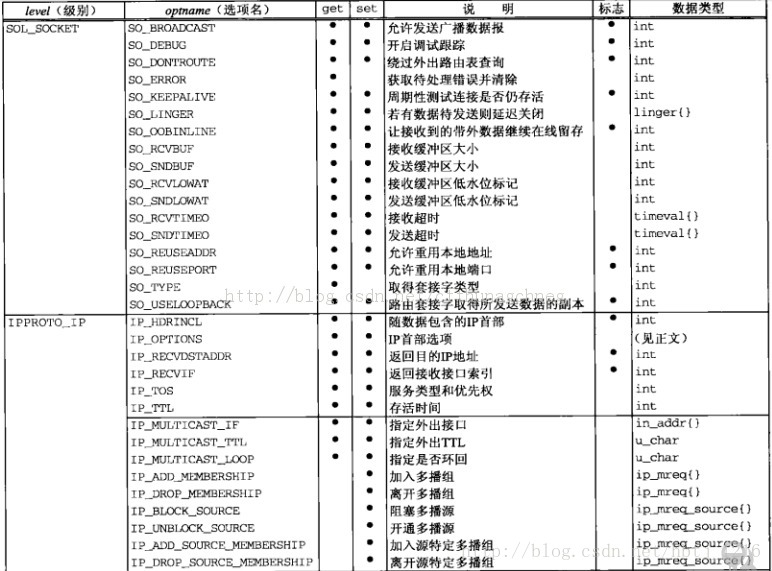

Netty应用
弹幕系统应用
弹幕系统概要设计
弹幕系统特点(参考B站)
1、实时性高
2、并发量大
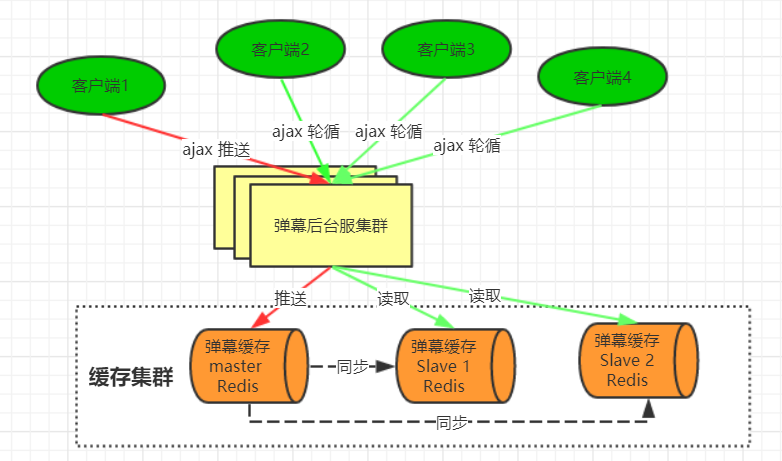
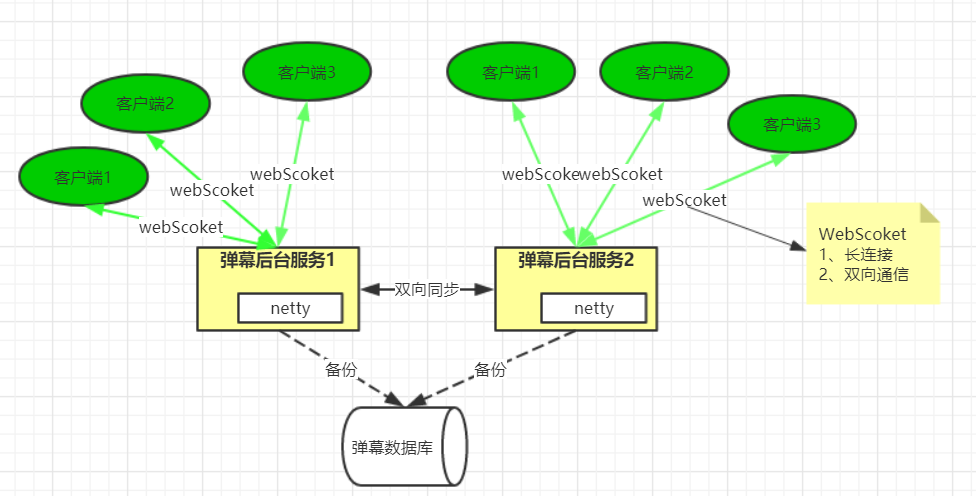
弹幕系统架构设计
业务架构
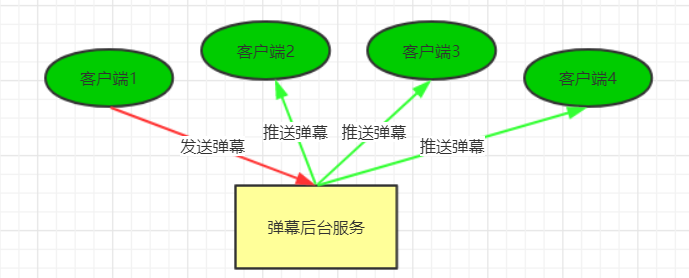
方案一
方案二
WebScoket协议解析实现
webSocket协议简介
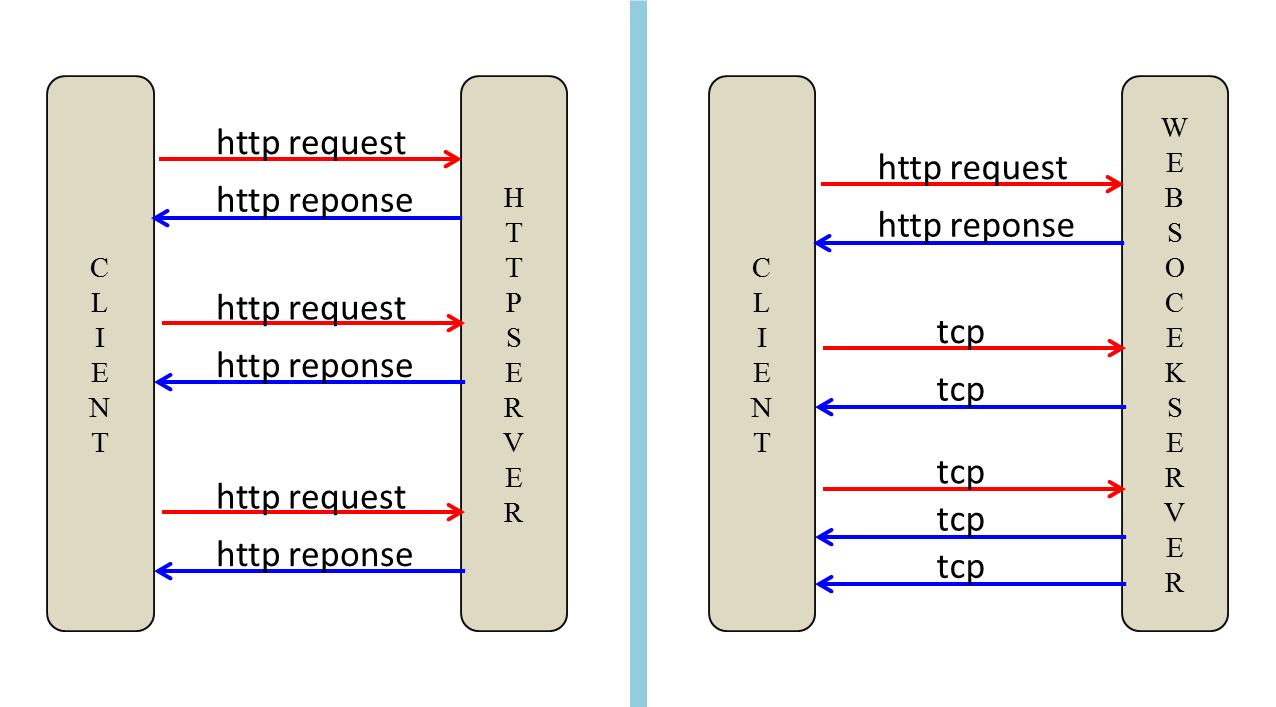
webSocket是html5开始提供的⼀种浏览器与服务器间进⾏全双工⼆进制通信协议(先建立HTTP/HTTPS,通过请求头升级为ws或者wss),其基于TCP双向全双工作进⾏消息传递,同⼀时刻即可以发⼜可以接收消息,相⽐Http的半双⼯协议性能有很⼤的提升
webSocket特点
1、单⼀TCP⻓连接,采⽤全双⼯通信模式
2、对代理、防火墙和路由器透明(和HTTP共用同一个端口,且ws连接开始前客户端通过HTTP请求表示切换到ws协议)
3、⽆头部信息、消息更精简
4、通过ping/pong来保活
5、服务器可以主动发送消息给客户端,无需客户端轮询
WebSocket协议报⽂格式
我们知道,任何应⽤协议都有其特有的报⽂格式,⽐如Http协议通过空格换⾏组成其报⽂。如http协议不同在于WebSocket属于⼆进制协议,通过规范进⼆进位来组成其报⽂。具体组成如下图:
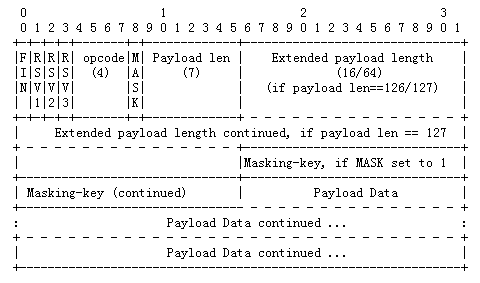
报⽂说明:
FIN标识是否为此消息的最后⼀个数据包,占1bitRSV1,RSV2,RSV3:⽤于扩展协议,⼀般为0,各占1bit
Opcode数据包类型(frame type),占4bits
0x0:标识⼀个中间数据包
0x1:标识⼀个text类型数据包
0x2:标识⼀个binary类型数据包
0x3-7:保留
0x8:标识⼀个断开连接类型数据包
0x9:标识⼀个ping类型数据包
0xA:表示⼀个pong类型数据包
0xB-F:保留
MASK:占1bits⽤于标识PayloadData是否经过掩码处理。如果是1,Masking-key域的数据即是掩码密钥,⽤于解码
PayloadData。客户端发出的数据帧需要进⾏掩码处理,所以此位是1。
Payload length Payload data的⻓度,占7bits,7+16bits,7+64bits:
如果其值在0-125,则是payload的真实⻓度。
如果值是126,则后⾯2个字节形成的16bits⽆符号整型数的值是payload的真实长度。注意,网络字节序,需要转换。
如果值是127,则后⾯8个字节形成的64bits⽆符号整型数的值是payload的真实长度。注意,网络字节序,需要转换。
Payload data应⽤层数据
WebSocket在浏览当中的使⽤Http连接与webSocket连接建⽴示意图:通过javaScript中的API可以直接操作WebSocket对象,其示例如下:
弹幕系统代码实现
通过javaScript中的API可以直接操作WebSocket对象,其示例如下:
1
2
3
4
5
6
7
8
9
10
11
12
13
14
| var ws = new WebSocket("ws://localhost:8080");
ws.onopen = function() {
console.log("打开连接");
ws.send("ddd");
};
ws.onmessage = function(evt) {
console.log(evt.data);
};
ws.onclose = function(evt) {
console.log(“WebSocketClosed!”);
ws.onerror = function(evt) {
console.log(“WebSocketError!”);
};
|
后端代码
1
2
3
4
5
6
7
8
9
10
11
12
13
14
15
16
17
18
19
20
21
22
23
24
25
26
27
28
29
30
31
32
33
34
35
36
37
38
39
40
41
42
43
|
public class WebsocketDanmuServer {
private int port;
public WebsocketDanmuServer(int port) {
this.port = port;
}
public void run() throws Exception {
EventLoopGroup bossGroup = new NioEventLoopGroup(2);
EventLoopGroup workerGroup = new NioEventLoopGroup(3);
try {
ServerBootstrap b = new ServerBootstrap();
b.group(bossGroup, workerGroup)
.channel(NioServerSocketChannel.class)
.childHandler(new WebsocketDanmuServerInitializer())
.option(ChannelOption.SO_BACKLOG, 128)
.childOption(ChannelOption.SO_KEEPALIVE, true);
System.out.println("SnakeGameServer 启动了" + port);
ChannelFuture f = b.bind(port).sync();
f.channel().closeFuture().sync();
} finally {
workerGroup.shutdownGracefully();
bossGroup.shutdownGracefully();
System.out.println("SnakeGameServer 关闭了");
}
}
public static void main(String[] args) throws Exception {
int port;
if (args.length > 0) {
port = Integer.parseInt(args[0]);
} else {
port = 8080;
}
new WebsocketDanmuServer(port).run();
}
}
|
1
2
3
4
5
6
7
8
9
10
11
12
13
14
15
16
17
18
19
20
21
22
23
24
25
|
public class WebsocketDanmuServerInitializer extends
ChannelInitializer<SocketChannel> {
@Override
public void initChannel(SocketChannel ch) throws Exception {
ChannelPipeline pipeline = ch.pipeline();
pipeline.addLast("http-decodec",new HttpRequestDecoder());
pipeline.addLast("http-encodec",new HttpResponseEncoder());
pipeline.addLast("http-aggregator",new HttpObjectAggregator(65536));
pipeline.addLast("http-chunked",new ChunkedWriteHandler());
pipeline.addLast("http-request",new HttpRequestHandler("/ws"));
pipeline.addLast("WebSocket-protocol",new WebSocketServerProtocolHandler("/ws"));
pipeline.addLast("WebSocket-request",new TextWebSocketFrameHandler());
}
}
|
HttpRequestHandler
1
2
3
4
5
6
7
8
9
10
11
12
13
14
15
16
17
18
19
20
21
22
23
24
25
26
27
28
29
30
31
32
33
34
35
36
37
38
39
40
41
42
43
44
45
46
47
48
49
50
51
52
53
54
55
56
57
58
59
60
61
62
63
64
65
66
67
68
69
70
71
72
73
74
|
public class HttpRequestHandler extends SimpleChannelInboundHandler<FullHttpRequest> {
private final String wsUri;
private static final File INDEX;
static {
URL location = HttpRequestHandler.class.getProtectionDomain().getCodeSource().getLocation();
try {
String path = location.toURI() + "WebsocketDanMu.html";
path = !path.contains("file:") ? path : path.substring(5);
INDEX = new File(path);
} catch (URISyntaxException e) {
throw new IllegalStateException("Unable to locate WebsocketChatClient.html", e);
}
}
public HttpRequestHandler(String wsUri) {
this.wsUri = wsUri;
}
@Override
public void channelRead0(ChannelHandlerContext ctx, FullHttpRequest request) throws Exception {
if (wsUri.equalsIgnoreCase(request.uri())) {
ctx.fireChannelRead(request.retain());
} else {
if (HttpHeaders.is100ContinueExpected(request)) {
send100Continue(ctx);
}
RandomAccessFile file = new RandomAccessFile(INDEX, "r");
HttpResponse response = new DefaultHttpResponse(request.getProtocolVersion(), HttpResponseStatus.OK);
response.headers().set(HttpHeaderNames.CONTENT_TYPE, "text/html; charset=UTF-8");
boolean keepAlive = HttpHeaders.isKeepAlive(request);
if (keepAlive) {
response.headers().set(HttpHeaderNames.CONTENT_LENGTH, file.length());
response.headers().set(HttpHeaderNames.CONNECTION, HttpHeaderValues.KEEP_ALIVE);
}
ctx.write(response);
if (ctx.pipeline().get(SslHandler.class) == null) {
ctx.write(new DefaultFileRegion(file.getChannel(), 0, file.length()));
} else {
ctx.write(new ChunkedNioFile(file.getChannel()));
}
ChannelFuture future = ctx.writeAndFlush(LastHttpContent.EMPTY_LAST_CONTENT);
if (!keepAlive) {
future.addListener(ChannelFutureListener.CLOSE);
}
file.close();
}
}
private static void send100Continue(ChannelHandlerContext ctx) {
FullHttpResponse response = new DefaultFullHttpResponse(HttpVersion.HTTP_1_1, HttpResponseStatus.CONTINUE);
ctx.writeAndFlush(response);
}
@Override
public void exceptionCaught(ChannelHandlerContext ctx, Throwable cause)
throws Exception {
Channel incoming = ctx.channel();
System.out.println("Client:"+incoming.remoteAddress()+"异常");
cause.printStackTrace();
ctx.close();
}
}
|
TextWebSocketFrameHandler
1
2
3
4
5
6
7
8
9
10
11
12
13
14
15
16
17
18
19
20
21
22
23
24
25
26
27
28
29
30
31
32
33
34
35
36
37
38
39
40
41
42
43
44
45
46
47
48
49
50
51
52
53
54
55
56
57
58
59
60
61
|
public class TextWebSocketFrameHandler extends
SimpleChannelInboundHandler<TextWebSocketFrame> {
public static ChannelGroup channels = new DefaultChannelGroup(GlobalEventExecutor.INSTANCE);
@Override
protected void channelRead0(ChannelHandlerContext ctx,
TextWebSocketFrame msg) throws Exception {
Channel incoming = ctx.channel();
for (Channel channel : channels) {
if (channel != incoming){
channel.writeAndFlush(new TextWebSocketFrame(msg.text()));
} else {
channel.writeAndFlush(new TextWebSocketFrame("我发送的"+msg.text() ));
}
}
}
@Override
public void handlerAdded(ChannelHandlerContext ctx) throws Exception {
Channel incoming = ctx.channel();
channels.writeAndFlush(new TextWebSocketFrame("[SERVER] - " + incoming.remoteAddress() + " 加入"));
channels.add(incoming);
System.out.println("Client:"+incoming.remoteAddress() +"加入");
}
@Override
public void handlerRemoved(ChannelHandlerContext ctx) throws Exception {
Channel incoming = ctx.channel();
channels.writeAndFlush(new TextWebSocketFrame("[SERVER] - " + incoming.remoteAddress() + " 离开"));
System.err.println("Client:"+incoming.remoteAddress() +"离开");
}
@Override
public void channelActive(ChannelHandlerContext ctx) throws Exception {
Channel incoming = ctx.channel();
System.out.println("Client:"+incoming.remoteAddress()+"在线");
}
@Override
public void channelInactive(ChannelHandlerContext ctx) throws Exception {
Channel incoming = ctx.channel();
System.err.println("Client:"+incoming.remoteAddress()+"掉线");
}
@Override
public void exceptionCaught(ChannelHandlerContext ctx, Throwable cause)
throws Exception {
Channel incoming = ctx.channel();
System.err.println("Client:"+incoming.remoteAddress()+"异常");
cause.printStackTrace();
ctx.close();
}
}
|