RabbitMQ安装以及入门 RabbitMQ简介 1、初识RabbitMQ rabbitmq是一个开源的消息代理和队列服务器,通过普通的协议(Amqp协议)来完成不同应用之间的数据共享(消费生产和消费者可以跨语言平台 ) rabbitmq是通过elang语言来开发的基于amqp协议
2、选择RabbitMQ的原因 1、图形化界面完善
2、Elang语言开发,跨平台不局限于JAVA
3、提供消息确认机制(发送方确认,消费方确认),死信队列、延迟消息等
4、开源、社区活跃、稳定
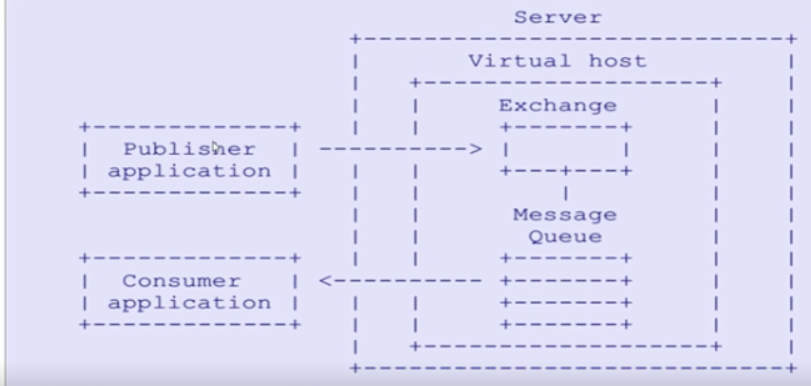
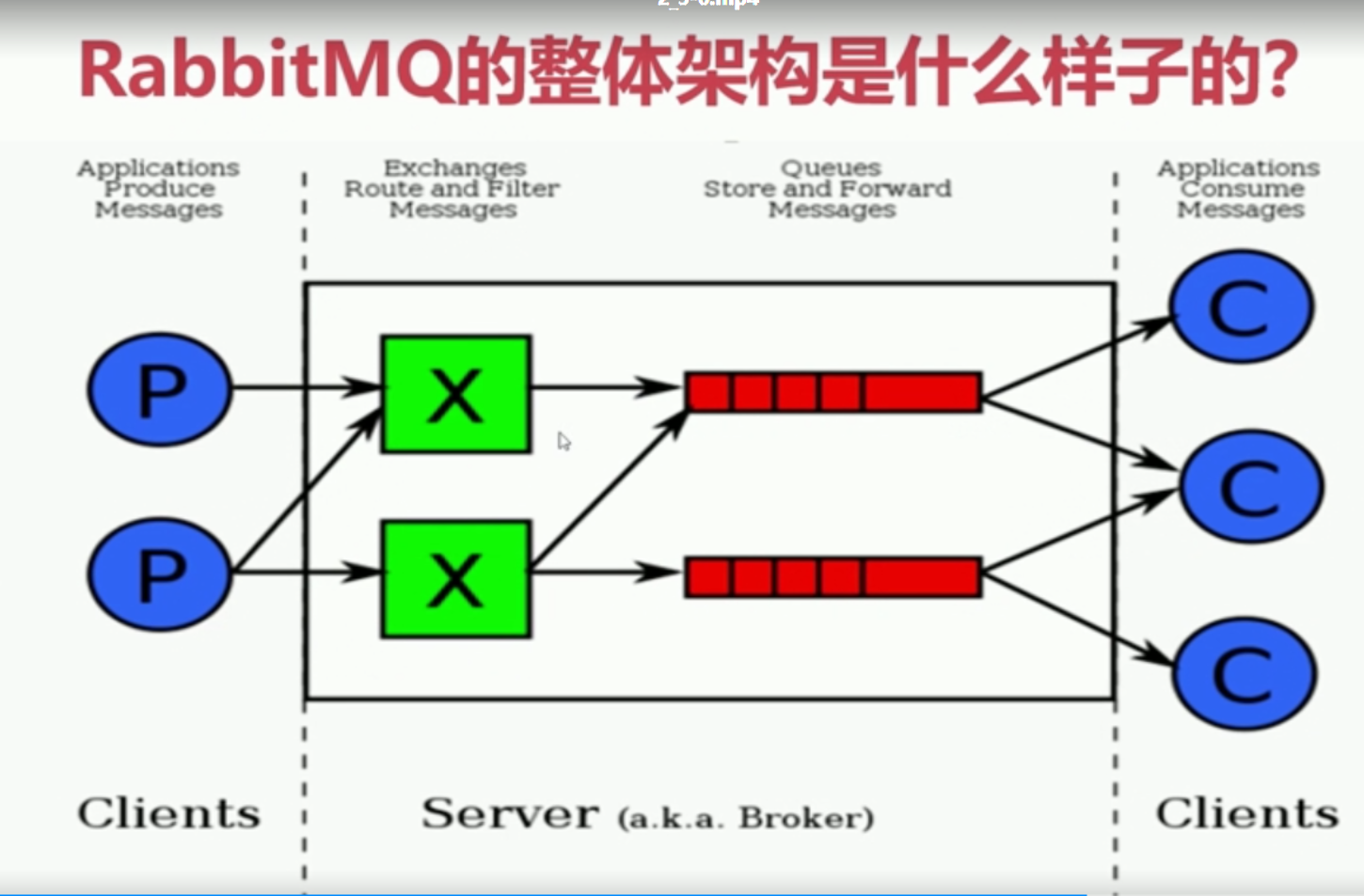
3、什么是AMQP协议(Advanced message queue protocol) 高级消息队列协议 server :又称为broker,接受客户端连接,实现amqp实体服务
Connection : 连接,应用程序与brokder建立网络连接
channel :网络通道,几乎所有的操作都是在channel中进行的,是进行消息对象的通道,客户端可以建立 多个通道,每一个channel表示一个会话任务
Message : 服务器和应用程序之间传递数据的载体,有properties(消息属性,用来修饰消息,比如消息的优 先级,延时投递)和Body(消息体)
virtual host (虚拟主机): 是一个逻辑概念,最上层的消息路由,一个虚拟主机中可以包含多个exhange 和 queue 但是一个虚拟主机中不能有名称相同的exchange 和queue
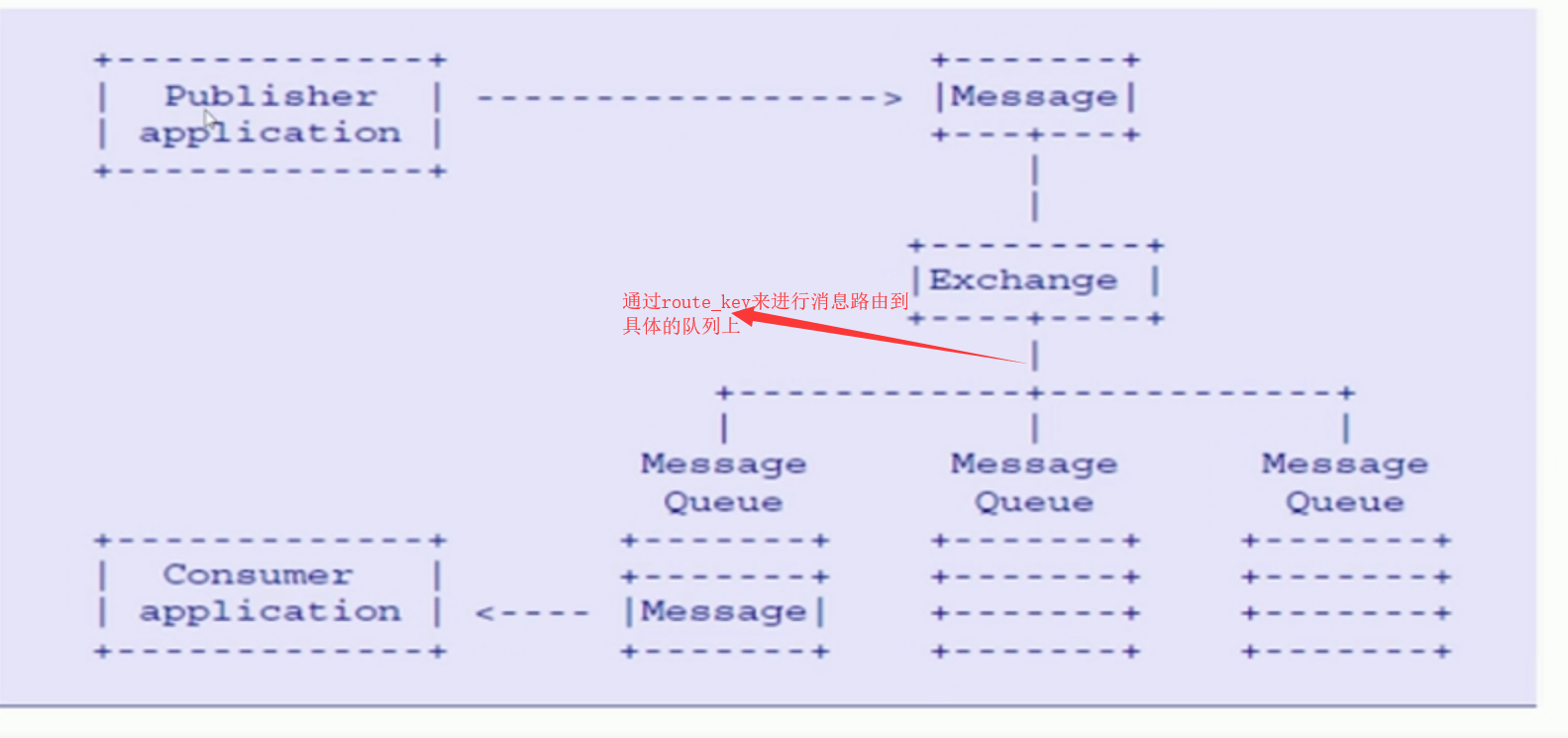
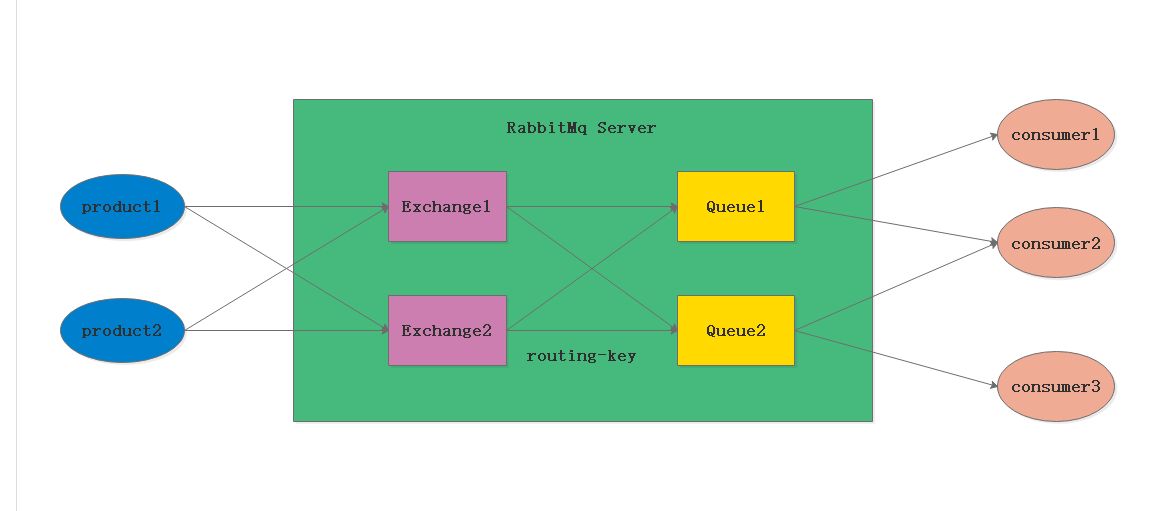
exchange 交换机: 消息直接投递到交换机上,然后交换机根据消息的路由key 来路由到对应绑定的队列上
bingding : 绑定 exchange 与queue的虚拟连接,bingding中可以包含route_key
route_key 路由key ,他的作用是在交换机上通过route_key来把消息路由到哪个队列上
queue :队列,用于来保存消息的载体,有消费者监听,然后消费消息
4、RabbitMQ的整体架构模型 5、RabbitMQ的消息是如何流转的
6、RabbitMQ、RabbitMQ、Kafka比较
Kafka
RabbitMQ
RocketMQ
设计定位
系统间的数据流通道,实时数据处理。常用于日志收集处理、监控数据处理等大数据量、并发量最高
可靠传输消息、处理普通业务,如下单、充值、消息推送等常规业务,并发量较高
可靠传输消息、并发量较高,高于RabbitMQs
顺序消费
支持
支持
支持
定时/延迟消息
不支持
支持
支持
事务消息
/
/
支持
消息查询·
/
/
支持类似mysql的语法查询服务器中的消息
消费方式
cosumer pull
comsumer pull / broker push
broker push
图形化界面
结合kibana
完美
丑
总结
优点:高吞吐、低延迟
优点:生态完善,图形化界面友好、支持多种语言
优点:支持事务消息

RabbitMQ安装与启动 ① :安装 rabbitmq所需要的依赖包
yum install build-essential openssl openssl-devel unixODBC unixODBC-devel make gcc gcc-
c++ kernel-devel m4 ncurses-devel tk tc xz
② :下载安装包 (PS:老师的下载包的目录是 cd /usr/local/software)
wget www.rabbitmq.com/releases/erlang/erlang-18.3-1.el7.centos.x86_64.rpm
wget http://repo.iotti.biz/CentOS/7/x86_64/socat-1.7.3.2-5.el7.lux.x86_64.rpm
wget www.rabbitmq.com/releases/rabbitmq-server/v3.6.5/rabbitmq-server-3.6.5-1.noarch.rpm
③ :安装服务命令
#第一步:安装erlang语言环境
rpm -ivh erlang-18.3-1.el7.centos.x86_64.rpm
#第二步:安装socat加解密软件
rpm -ivh socat-1.7.3.2-5.el7.lux.x86_64.rpm
#第三步:最后安装rabbitmqrpm -ivh rabbitmq-server-3.6.5-1.noarch.rpm
④ :修改集群用户与连接心跳检测
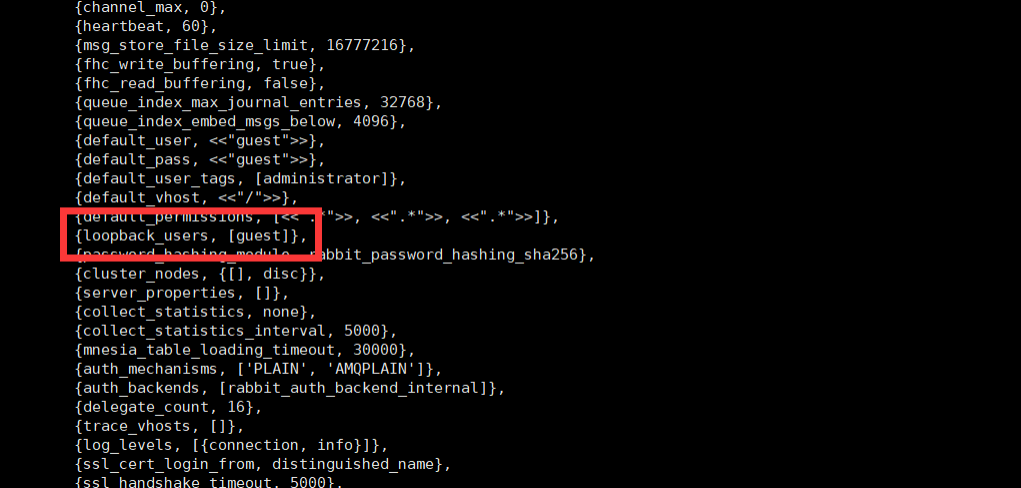
注意修改 vim /usr/lib/rabbitmq/lib/rabbitmq_server-3.6.5/ebin/rabbit.app文件
修改:loopback_users 中的 <<”guest”>>,只保留guest(不修改只能通过localhost访问)
5、下载延时组件
wget https://dl.bintray.com/rabbitmq/community-plugins/3.6.x/rabbitmq_delayed_message_exchange/rabbitmq_delayed_message_exchange-20171215-3.6.x.zip
解压延时插件: unzip
rabbitmq_delayed_message_exchange-20171215-3.6.x.zip
把延时插件拷贝到指定目录下:cp rabbitmq_delayed_message_exchange-20171215-3.6.x.ez
/usr/lib/rabbitmq/lib/rabbitmq_server-3.7.5/plugins
启动延时插件: rabbitmq-plugins enable rabbitmq_delayed_message_exchange
6、访问ip:15672 访问rabbitMQ管理控制台
username:guest
password:guest
测试生成和消费消息 1、生产消息
1
2
3
4
5
6
7
8
9
10
11
12
13
14
15
16
17
18
19
20
21
22
23
24
25
26
27
28
29
30
31
32
33
34
35
36
37
38
public class RabbitmqProducter public static void main (String[] args) throws IOException, TimeoutException new ConnectionFactory();"192.168.136.1" );5672 );"/" );"guest" );"guest" );for (int i=0 ;i<5 ;i++) {"hello--" +i;"" ,"test-queue-01" ,null ,message.getBytes());
2、消费消息
1
2
3
4
5
6
7
8
9
10
11
12
13
14
15
16
17
18
19
20
21
22
23
24
25
26
27
28
29
30
31
32
33
34
35
36
37
38
39
40
41
42
43
44
public class RabbitmqConsumer public static void main (String[] args) throws IOException, InterruptedException, TimeoutException new ConnectionFactory();"192.168.136.1" );5672 );"/" );"guest" );"guest" );"test-queue-01" ;true ,false ,false ,null );new QueueingConsumer(channel);true ,queueingConsumer);while (true ) {new String(delivery.getBody());"消费消息:" +reserveMsg);
Rabbitmq交换机详解 1、作用 接受生产者的消息,然后根据路由键 把消息投递到跟交换机绑定的对应的队列上
2、属性 Name:交换机的名称
Type:交换机的类型,direct,topic,fanout,headers
Durability:是否需要持久化
autodelete:假如没有队列绑定到该交换机,那么该交换机会自动删除
Internal:当前交换机是否用户rabbitmq内部使用不常用,默认为false
Argurements:扩展参数,用户扩展AMQP 定制化协议
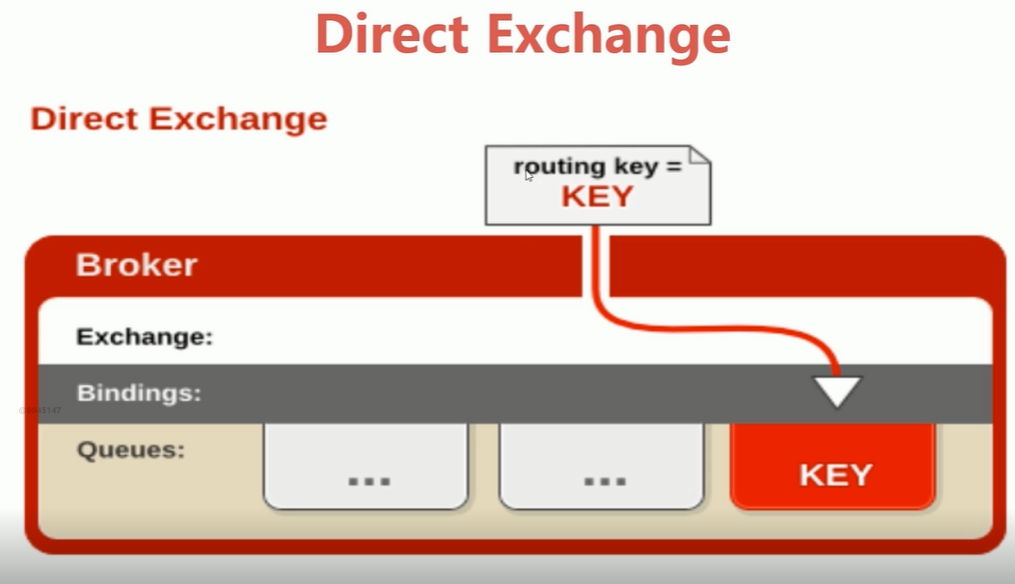
3、类型 直连交换机 directExchange 所以发送的direct exhchange 的消息都会被投递到与该交换机绑定且routing key = Key 的queue上。
1
2
3
4
5
6
7
8
9
10
11
12
13
14
15
16
17
18
19
20
21
22
23
24
25
26
27
28
29
30
31
32
33
34
35
36
37
38
39
40
41
42
43
44
public class Consumer public static void main (String[] args) throws IOException, TimeoutException, InterruptedException "directChange" ,"direct" ,false ,false ,null );"directQueue" ;true ,false ,false ,null );"directChange" ,"directChange.key" );"directChange" ,"directChange.key1" );new QueueingConsumer(channel);true ,queueingConsumer);while (true ) {new String(delivery.getBody());"消费消息:-----" +reciverMessage);
1
2
3
4
5
6
7
8
9
10
11
12
13
14
15
16
17
public class Producer public static void main (String[] args) throws IOException, TimeoutException "directChange" ;"directChange.key" ;"hello handsomeboy " ;null ,messageBody.getBytes());
主题交换机 TopicExchange 就是在队列上绑到topic 交换机上的路由key 可以是通过通配符来匹配的通配符的规则是
log.#可以匹配一个单词也可以匹配多个单词,
比如 log.#可以匹配log.a log.a.b log.a.b
log.* 可以匹配一个单词
比如 log.* 可以匹配log.a 但是不可以匹配log.a.b
1 2 3 4 5 6 7 8 9 10 11 12 13 14 15 16 17 18 19 20 21 22 23 24 25 26 27 28 29 30 31 32 33 34 35 36 37 38 39 40 41 42 43 44 45 46 47 48 49 50 51 52 53 54 55 56 57 58 59 60 61 消费者1 public class FanoutExchangeConsumer public static void main (String[] args) throws IOException, TimeoutException, InterruptedException "topicExchange" ;"topic" ;true ,true ,null );"topic.queue" ;true ,false ,false ,null );"topic.*" ;new QueueingConsumer(channel);true ,queueingConsumer);while (true ) {"FanoutExchangeConsumer接受到消息:" +new String(delivery.getBody()));2 public class FanoutExchangeConsumer1 public static void main (String[] args) throws IOException, TimeoutException, InterruptedException "topicExchange" ;"topic" ;true ,true ,null );"topic.queue1" ;true ,false ,false ,null );"topic.#" ;new QueueingConsumer(channel);true ,queueingConsumer);while (true ) {"FanoutExchangeConsumer1接受到消息:" +new String(delivery.getBody()));
1
2
3
4
5
6
7
8
9
10
11
12
13
14
15
16
public class TopicExchangeProductor public static void main (String[] args) throws IOException, TimeoutException "topicExchange" ;"topic.key1" ;"topic.key2" ;"topic.key.key3" ;null ,"我是第一条消息" .getBytes());null ,"我是第二条消息" .getBytes());null ,"我是第三条消息" .getBytes());
扇形交换机 fanoutExchange 就是消息通过从交换机到队列上不会通过路由key 所以该模式的速度是最快的 只要和交换机绑定的那么消息就会 被分发到与之绑定的队列上
1
2
3
4
5
6
7
8
9
10
11
12
13
14
15
16
public class FanoutExchangeProductor public static void main (String[] args) throws IOException, TimeoutException "fanoutExchange" ;"hello handsome boy " ;"" ,null ,"我是第一条消息" .getBytes());"456" ,null ,"我是第二条消息" .getBytes());"789" ,null ,"我是第三条消息" .getBytes());
1
2
3
4
5
6
7
8
9
10
11
12
13
14
15
16
17
18
19
20
21
22
23
24
25
26
27
public class FanoutExchangeConsumer public static void main (String[] args) throws IOException, TimeoutException, InterruptedException "fanoutExchange" ;"fanout" ;true ,true ,null );"fanout.queue" ;true ,false ,false ,null );"" );new QueueingConsumer(channel);true ,queueingConsumer);while (true ) {"接受到消息:" +new String(delivery.getBody()));
队列、绑定、虚拟主机、消息 绑定 : exchange 与之间的连接关系 (通过路由规则 )
队列 :用来存储消息的实体
队列的属性 : durability 消息是否被持久化
AutoDelete :表示最后一个监听被移除那么该队列就会被删除
消息 :用来生产着和消费者之间传递数据的
消息属性 : 包括消息体 body 和属性 properties
常用属性 :delivery mode , headers, content_type(消息类型 ) content_encoding(消息编码 ),priporty(消息优
先级 ) ,correntlation_id(最为消息唯一的 id),reply_to(消息失败做重回队列) ,expiretion(消息的过期时
间 ),message_id(消息 id);timestamp,type,user_id , app_id,cluster_id等
1
2
3
4
5
6
7
8
9
10
11
12
13
14
15
16
17
18
19
20
21
22
23
24
25
26
27
28
29
30
31
32
33
34
35
36
37
38
39
40
public class RabbitmqMessageProducter public static void main (String[] args) throws IOException, TimeoutException new HashMap<>();"company" , "study" );"name" , "handsome boy" );new AMQP.BasicProperties().builder()2 )"10000" )"utf-8" )for (int i = 0 ; i < 5 ; i++) {"hello--" + i;"directchange" , "directchange.key" , basicProperties, message.getBytes());
1
2
3
4
5
6
7
8
9
10
11
12
13
14
15
16
17
18
19
20
21
22
23
24
25
26
27
28
29
30
31
32
33
34
35
36
37
38
39
40
41
42
43
44
45
46
47
48
49
50
51
52
53
public class RabbitmqMessageConsumer public static void main (String[] args) throws IOException, TimeoutException, InterruptedException "directchange" ;"direct" ;"directqueue" ;"directchange.key" ;true ,false ,null );true ,false ,false ,null );new QueueingConsumer(channel);true ,queueingConsumer);while (true ) {new String(delivery.getBody());"encoding:" +delivery.getProperties().getContentEncoding());"company:" +delivery.getProperties().getHeaders().get("company" ));"correlationId:" +delivery.getProperties().getCorrelationId());