Explain详解与索引最佳实践
Explain工具介绍
使用EXPLAIN关键字可以模拟优化器执行SQL语句,分析你的查询语句或是结构的性能瓶颈,在 select语句之前增加explain关键字,MySQL会在查询上设置一个标记,执行查询会返回执行计划的信息,而不是执行这条SQL
注意:如果 from 中包含子查询,仍会执行该子查询,将结果放入临时表中
Explain分析示例
1 | |
explain select * from actor;
在查询中的每个表会输出一行,如果有两个表通过 join 连接查询,那么会输出两行
explain 两个变种
1)explain extended:会在 explain 的基础上额外提供一些查询优化的信息。紧随其后通 过 show warnings 命令可以得到优化后的查询语句,从而看出优化器优化了什么。额外还有 filtered 列,是一个半分比的值,rows * filtered/100 可以估算出将要和 explain 中前一个表 进行连接的行数(前一个表指 explain 中的id值比当前表id值小的表)。
explain extended select * from film where id = 1;

show warnings;

2)explain partitions:相比 explain 多了个 partitions 字段,如果查询是基于分区表的话,会显示查询将访问的分区。
explain中的列
接下来我们将展示 explain 中每个列的信息。
1、id列
id列的编号是 select 的序列号,有几个 select 就有几个id,并且id的顺序是按 select 出现的顺序增长的。
id列越大执行优先级越高,id相同则从上往下执行,id为NULL最后执行。
2、select_type列
select_type 表示对应行是简单还是复杂的查询。
1)simple:简单查询。查询不包含子查询和union
explain select * from film where id = 2;

2)primary:复杂查询中最外层的 select
3)subquery:包含在 select 中的子查询(不在 from 子句中)
4)derived:包含在 from 子句中的子查询。MySQL会将结果存放在一个临时表中,也称为
派生表(derived的英文含义) 用这个例子来了解 primary、subquery 和 derived 类型
1 | |

5)union:在 union 中的第二个和随后的 select
explain select 1 union all select 1

3、table列
这一列表示 explain 的一行正在访问哪个表。
当 from 子句中有子查询时,table列是
当有 union 时,UNION RESULT 的 table 列的值为<union1,2>,1和2表示参与 union 的select 行id。
4、type列
这一列表示关联类型或访问类型,即MySQL决定如何查找表中的行,查找数据行记录的大概
范围。
依次从最优到最差分别为:system > const > eq_ref > ref > range > index > ALL
一般来说,得保证查询达到range级别,最好达到ref
NULL:mysql能够在优化阶段分解查询语句,在执行阶段用不着再访问表或索引。例如:在
索引列中选取最小值,可以单独查找索引来完成,不需要在执行时访问表
explain select min(id) from film;(id列刚好再索引列内)

const, system:mysql能对查询的某部分进行优化并将其转化成一个常量(可以看show warnings 的结果。
用于 primary key 或 unique key 的所有列与常数比较时,所以表最多有一个匹配行,读取1次,速度比较快。system是const的特例,查询范围里表里只有一条元组匹配时为 system
explain extended select * from film where id = 1; explain extended select * from (select * from film where id = 1) tmp;
 show warnings;

eq_ref:primary key 或 unique key 索引的所有部分被连接使用 ,最多只会返回一条符合条件的记录。这可能是在 const 之外最好的联接类型了,简单的 select 查询不会出现这种type。
explain select * from film_actor left join film on film_actor.film_id = film.id;
ref:相比 eq_ref,不使用唯一索引,而是使用普通索引或者唯一性索引的部分前缀,索引要和某个值相比较,可能会找到多个符合条件的行。
1、简单 select 查询,name是普通索引(非唯一索引)
explain select * from film where name = ‘film1’;

2、关联表查询,idx_film_actor_id是film_id和actor_id的联合索引,这里使用到了film_actor的左边前缀film_id部分。
explain select film_id from film left join film_actor on film.id = film_actor.film_id;
range:范围扫描通常出现在 in(), between ,> ,<, >= 等操作中。使用一个索引来检索给定范围的行。
explain select * from actor where id > 1;

index:扫描全表索引,这通常比ALL快一(所有字段都在索引范围内)
explain select * from film;

ALL:即全表扫描,意味着mysql需要从头到尾去查找所需要的行。通常情况下这需要增加索引来进行优化了
explain select * from actor;

5、possible_keys列
这一列显示查询可能使用哪些索引来查找。
explain 时可能出现 possible_keys 有列,而 key 显示 NULL 的情况,这种情况是因为表中数据不多,mysql认为索引对此查询帮助不大,选择了全表查询。如果该列是NULL,则没有相关的索引。在这种情况下,可以通过检查 where 子句看是否可以创造一个适当的索引来提高查询性能,然后用 explain 查看效果。
6、key列
这一列显示mysql实际采用哪个索引来优化对该表的访问。
如果没有使用索引,则该列是 NULL。如果想强制mysql使用或忽视possible_keys列中的索
引,在查询中使用 force index、ignore index。
explain select * from actor ignore index(PRIMARY) where id > 1
1 | |

7、key_len列
这一列显示了mysql在索引里使用的字节数,通过这个值可以算出具体使用了索引中的哪些列。
举例来说,film_actor的联合索引 idx_film_actor_id 由 film_id 和 actor_id 两个int列组成,
并且每个int是4字节。通过结果中的key_len=4可推断出查询使用了第一个列:film_id列来执
行索引查找。
explain select * from film_actor where film_id = 2
key_len计算规则如下:
- 字符串
- char(n):n字节长度
- varchar(n):2字节存储字符串长度,如果是utf-8,则长度 3n + 2
- 数值类型
- tinyint:1字节
- smallint:2字节
- int:4字节
- bigint:8字节
- 时间类型
- date:3字节
- timestamp:4字节
- datetime:8字节
- 如果字段允许为 NULL,需要1字节记录是否为 NULL
索引最大长度是768字节,当字符串过长时,mysql会做一个类似左前缀索引的处理,将前半部分的字符提取出来做索引。
explain select * from film_actor where film_id = 1
explain select * from film_actor where film_id = 1 and actor_id = 1
8、ref列
这一列显示了在key列记录的索引中,表查找值所用到的列或常量,常见的有:const(常量),字段名(例:film.id)
9、rows列
这一列是mysql估计要读取并检测的行数,注意这个不是结果集里的行数。
10、 Extra列
这一列展示的是额外信息。常见的重要值如下:
1)Using index:使用覆盖索引
explain select film_id from film_actor where film_id = 1;

2)Using where:使用 where 语句来处理结果,查询的列未被索引覆盖
explain select * from actor where name = ‘a’;
3)Using index condition:查询的列不完全被索引覆盖,where条件中是一个前导列的范围;
explain select * from film_actor where film_id > 1;
4)Using temporary:mysql需要创建一张临时表来处理查询。出现这种情况一般是要进行
优化的,首先是想到用索引来优化。
1、actor.name没有索引,此时创建了张临时表来distinct
explain select distinct name from actor;
2、film.name建立了idx_name索引,此时查询时extra是using index,没有用临时表
explain select distinct name from film;

5)Using filesort:将用外部排序而不是索引排序,数据较小时从内存排序,否则需要在磁盘完成排序。这种情况下一般也是要考虑使用索引来优化的。
1、actor.name未创建索引,会浏览actor整个表,保存排序关键字name和对应的id,然后排序name并检索行记录
explain select * from actor order by name;

2、film.name建立了idx_name索引,此时查询时extra是using index
explain select * from film order by name;

6)Select tables optimized away:使用某些聚合函数(比如 max、min)来访问存在索引的某个字段
explain select min(id) from film;

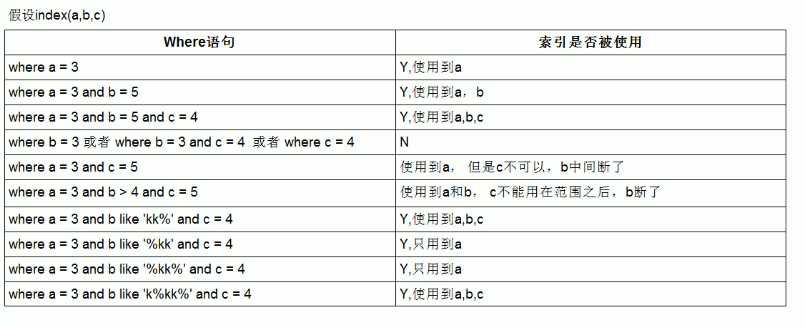
索引最佳实践
1 | |
1.全值匹配
EXPLAIN SELECT * FROM employees WHERE name= ‘LiLei’;

EXPLAIN SELECT * FROM employees WHERE name= ‘LiLei’ AND age = 22;

EXPLAIN SELECT * FROM employees WHERE name= ‘LiLei’ AND age = 22 AND position =’manager’;

2.最左前缀法则
如果索引了多列,要遵守最左前缀法则。指的是查询从索引的最左前列开始并且不跳过索引中的列
EXPLAIN SELECT * FROM employees WHERE age = 22 AND position =’manager’;
EXPLAIN SELECT * FROM employees WHERE position = ‘manager’;
EXPLAIN SELECT * FROM employees WHERE name = ‘LiLei’;

3.不在索引列上做任何操作
(计算、函数、(自动or手动)类型转换),会导致索引失效而转向全表扫描
EXPLAIN SELECT * FROM employees WHERE name = ‘LiLei’;
EXPLAIN SELECT * FROM employees WHERE left(name,3) = ‘LiLei’;

给hire_time增加一个普通索引:
1 | |
EXPLAIN select * from employees where date(hire_time) =’2018-09-30’;

转化为日期范围查询,会走索引,再还原最初索引状态
1 | |

4.存储引擎不能使用索引中范围条件右边的列
EXPLAIN SELECT * FROM employees WHERE name= ‘LiLei’ AND age = 22 AND position =’manager’;
EXPLAIN SELECT * FROM employees WHERE name= ‘LiLei’ AND age > 22 AND position =’manager’;

5.尽量使用覆盖索引
(只访问索引的查询(索引列包含查询列)),减少select *语句
EXPLAIN SELECT name,age FROM employees WHERE name= ‘LiLei’ AND age = 23 AND position =’manager’;

EXPLAIN SELECT * FROM employees WHERE name= ‘LiLei’ AND age = 23 AND position =’manager’;

6.mysql在使用不等于(!=或者<>)的时候无法使用索引会导致全表扫描
EXPLAIN SELECT * FROM employees WHERE name != ‘LiLei’;

走索引覆盖优化
EXPLAIN SELECT name FROM employees WHERE name != ‘LiLei’;
7.is null,is not null 也无法使用索引
EXPLAIN SELECT * FROM employees WHERE name is null
优化方案:字段定义not null且设置默认值
8.like以通配符开头(’%abc…’)
mysql索引失效会变成全表扫描操作
EXPLAIN SELECT * FROM employees WHERE name like ‘%Lei’
EXPLAIN SELECT * FROM employees WHERE name like ‘Lei%’
问题:解决like’%字符串%’索引不被使用的方法?
a)使用覆盖索引,查询字段必须是建立覆盖索引字段
EXPLAIN SELECT name,age,position FROM employees WHERE name like ‘%Lei%’;
b)如果不能使用覆盖索引则可能需要借助搜索引擎 如:ES
9.字符串不加单引号索引失效
EXPLAIN SELECT * FROM employees WHERE name = ‘1000’;
EXPLAIN SELECT * FROM employees WHERE name = 1000;

10.少用or或in
用它查询时,mysql不一定使用索引,mysql内部优化器会根据检索比例、表大小等多个因素整体评估是否使用索引,详见范围查询优化
EXPLAIN SELECT * FROM employees WHERE name = ‘LiLei’ or name = ‘HanMeimei’;

11.范围查询优化
给年龄添加单值索引
1 | |
explain select * from employees where age >=1 and age <=2000;
没走索引原因:mysql内部优化器会根据检索比例、表大小等多个因素整体评估是否使用索引。比如这个例子,可能是由于单次数据量查询过大导致优化器最终选择不走索引
优化方法:可以讲大的范围拆分成多个小范围
explain select * from employees where age >=0 and age <=10;
还原最初索引状态
1 | |
索引使用总结: