Webmagic 是什么 WebMagic是一款简单灵活的爬虫框架,它的的架构设计参照了Scrapy,目标是尽量的模块化,并体现爬虫的功能特点。
架构设计 WebMagic的四个组件
1.Downloader Downloader负责从互联网上下载页面,以便后续处理。WebMagic默认使用了Apache HttpClient 作为下载工具。
2.PageProcessor PageProcessor负责解析页面,抽取有用信息,以及发现新的链接。WebMagic使用Jsoup 作为HTML解析工具,并基于其开发了解析XPath的工具Xsoup 。
在这四个组件中,PageProcessor对于每个站点每个页面都不一样,是需要使用者定制的部分。
3.Scheduler Scheduler负责管理待抓取的URL,以及一些去重的工作。WebMagic默认提供了JDK的内存队列来管理URL,并用集合来进行去重。也支持使用Redis进行分布式管理。
除非项目有一些特殊的分布式需求,否则无需自己定制Scheduler。
4.Pipeline Pipeline负责抽取结果的处理,包括计算、持久化到文件、数据库等。WebMagic默认提供了“输出到控制台”和“保存到文件”两种结果处理方案。
Pipeline定义了结果保存的方式,如果你要保存到指定数据库,则需要编写对应的Pipeline。对于一类需求一般只需编写一个Pipeline。
用于数据流转的对象 1. Request Request是对URL地址的一层封装,一个Request对应一个URL地址。
它是PageProcessor与Downloader交互的载体,也是PageProcessor控制Downloader唯一方式。
除了URL本身外,它还包含一个Key-Value结构的字段extra。你可以在extra中保存一些特殊的属性,然后在其他地方读取,以完成不同的功能。例如附加上一个页面的一些信息等。
2. Page Page代表了从Downloader下载到的一个页面——可能是HTML,也可能是JSON或者其他文本格式的内容。
Page是WebMagic抽取过程的核心对象,它提供一些方法可供抽取、结果保存等。在第四章的例子中,我们会详细介绍它的使用。
3. ResultItems ResultItems相当于一个Map,它保存PageProcessor处理的结果,供Pipeline使用。它的API与Map很类似,值得注意的是它有一个字段skip,若设置为true,则不应被Pipeline处理
控制爬虫运转的引擎–Spider Spider是WebMagic内部流程的核心。Downloader、PageProcessor、Scheduler、Pipeline都是Spider的一个属性,这些属性是可以自由设置的,通过设置这个属性可以实现不同的功能。Spider也是WebMagic操作的入口,它封装了爬虫的创建、启动、停止、多线程等功能
缺点 不适合爬取动态或者动态加载页面,而现如今大部门大厂网站都做了动态渲染或者反扒。如果需要爬取,可以结合selenium +浏览器驱动访问页面。
Selenium 是什么 Selenium 通过使用 WebDriver 支持市场上所有主流浏览器的自动化。 WebDriver 是一个 API 和协议,它定义了一个语言中立的接口,用于控制 web 浏览器的行为。 每个浏览器都有一个特定的 WebDriver 实现,称为驱动程序。 驱动程序是负责委派给浏览器的组件,并处理与 Selenium 和浏览器之间的通信。总的来说,selenium是一种浏览器控制框架。
怎么用 Webmagic+Selenium+Chormedriver Boss直聘网爬取 DDL 1 2 3 4 5 6 7 8 9 10 11 12 13 14 15 16 17 18 19 20 21 22 23 24 25 create table `job_info`bigint (20 ) not null auto_increment comment '主键id' ,VARCHAR (100 ) NOT NULL DEFAULT '' COMMENT 'jobid' ,VARCHAR (50 ) NOT NULL DEFAULT '' COMMENT 'workLocation' ,VARCHAR (200 ) NOT NULL DEFAULT '' COMMENT 'jobBenifit' ,VARCHAR (200 ) NOT NULL DEFAULT '' COMMENT 'workExperience' ,VARCHAR (200 ) NOT NULL DEFAULT '' COMMENT 'degreeExperience' ,VARCHAR (2000 ) NOT NULL DEFAULT '' COMMENT 'jobDesc' ,varchar (100 ) default null comment '公司名称' ,varchar (200 ) default null comment '公司联系方式' ,'公司信息' ,varchar (100 ) default null comment '职位名称' ,varchar (200 ) default null comment '工作地点' ,'职位信息' ,float (10 , 2 ) default null comment '薪资范围,最小' ,float (10 , 2 ) default null comment '薪资范围,最大' ,int default 12 not null comment '薪资月数' ,varchar (1500 ) default null comment '招聘信息详情页' ,time ` varchar (10 ) default null comment '职位最近发布时间' ,varchar (50 ) default null comment '公司成立时间' ,varchar (50 ) default null comment '公司注册资本' ,varchar (50 ) default null comment '职位最近发布时间' ,primary key (`id`)= InnoDB comment = '招聘信息' ;
application.properties 1 2 3 4 spring.datasource.driver-class-name =com.mysql.jdbc.Driver spring.datasource.url =jdbc:mysql://localhost:3306/selenium?characterEncoding=UTF-8&useUnicode=true&useSSL=false&tinyInt1isBit=false&allowPublicKeyRetrieval=true&serverTimezone=Asia/Shanghai spring.datasource.username =root spring.datasource.password =123456
pom.xml 1 2 3 4 5 6 7 8 9 10 11 12 13 14 15 16 17 18 19 20 21 22 23 24 25 26 27 28 29 30 31 32 33 34 35 36 37 38 39 40 41 42 43 44 45 46 47 48 49 50 51 52 53 54 55 56 57 58 59 60 61 62 63 64 65 66 67 68 69 70 71 72 73 74 75 76 77 <parent > <groupId > org.springframework.boot</groupId > <artifactId > spring-boot-starter-parent</artifactId > <version > 2.6.6</version > <relativePath /> </parent > <properties > <maven.compiler.source > 8</maven.compiler.source > <maven.compiler.target > 8</maven.compiler.target > <project.build.sourceEncoding > UTF-8</project.build.sourceEncoding > </properties > <dependencies > <dependency > <groupId > cn.hutool</groupId > <artifactId > hutool-all</artifactId > <version > 5.8.27</version > </dependency > <dependency > <groupId > org.springframework.boot</groupId > <artifactId > spring-boot-starter-web</artifactId > </dependency > <dependency > <groupId > us.codecraft</groupId > <artifactId > webmagic-core</artifactId > <version > 0.8.0</version > <exclusions > <exclusion > <groupId > org.slf4j</groupId > <artifactId > slf4j-log4j12</artifactId > </exclusion > </exclusions > </dependency > <dependency > <groupId > us.codecraft</groupId > <artifactId > webmagic-extension</artifactId > <version > 0.8.0</version > <exclusions > <exclusion > <groupId > org.slf4j</groupId > <artifactId > slf4j-log4j12</artifactId > </exclusion > </exclusions > </dependency > <dependency > <groupId > org.apache.commons</groupId > <artifactId > commons-lang3</artifactId > </dependency > <dependency > <groupId > com.baomidou</groupId > <artifactId > mybatis-plus-boot-starter</artifactId > <version > 3.1.1</version > </dependency > <dependency > <groupId > mysql</groupId > <artifactId > mysql-connector-java</artifactId > <version > 5.1.47</version > </dependency > <dependency > <groupId > org.seleniumhq.selenium</groupId > <artifactId > selenium-java</artifactId > <version > 4.22.0</version > </dependency > <dependency > <groupId > org.projectlombok</groupId > <artifactId > lombok</artifactId > <version > 1.18.22</version > </dependency > <dependency > <groupId > org.seleniumhq.selenium</groupId > <artifactId > selenium-java</artifactId > <version > 3.13.0</version > </dependency > </dependencies >
webmagic3件套 MyBossDownloader :注入谷歌浏览器驱动1 2 3 4 5 6 7 8 9 10 11 12 13 14 15 16 17 18 19 20 21 22 23 24 25 26 27 28 29 30 31 32 33 34 35 36 37 38 39 40 41 42 43 44 45 46 47 48 49 50 51 52 53 54 55 56 57 58 59 60 61 62 63 64 65 66 67 68 69 70 71 72 73 74 75 76 77 78 79 80 81 82 83 84 85 86 87 88 89 90 91 92 93 94 95 96 97 98 99 100 101 @Component public class MyBossDownloader implements Downloader private RemoteWebDriver driver;public MyBossDownloader () "webdriver.chrome.driver" ,"C:\\Users\\81566\\Downloads\\chromedriver-win64\\chromedriver-win64\\chromedriver.exe" );new ChromeOptions();"excludeSwitches" , Arrays.asList("enable-automation" ));new ChromeDriver(chromeOptions);@SneakyThrows @Override public Page download (Request request, Task task) "url:" +url);if (!url.contains("detail" )){if (StrUtil.isNotBlank(request.getExtra("url" ))){"url" );if (!url.equals(driver.getCurrentUrl())){8000 ,12000 ));2000 );"#wrap > div.page-job-wrapper > div.page-job-inner > div > div.job-list-wrapper > div.search-job-result > div > div > div > a" );1 );if (!"disabled" .equals(nextPage.getAttribute("class" ))){"arguments[0].click();" , nextPage);8000 ,12000 ));return createPage(driver.getCurrentUrl(), driver.getPageSource(), "page" );"翻页失败" );else {8000 ,12000 ));return createPage(driver.getCurrentUrl(), driver.getPageSource(), "page" );else {2000 ,5000 ));"pageDetail" );"jobId" );"jobId" , jobId);return page;return null ;private void doScrollToEnd () throws InterruptedException long height = (long ) driver.executeScript("return document.body.scrollHeight" );for (int i = 0 ; i < height - 1000 ; i = i + RandomUtil.randomInt(200 ,500 )) {"window.scrollTo(0,{})" ,i));200 ,1000 ));private Page createPage (String url, String html, String pageName) throws InterruptedException new Page();new PlainText(url);int retry = 0 ;while (html.contains("请稍候" ) && url.contains("detail" ) && retry < 1 ){"加载无效,重新加载" );5000 );new Request(url);"pageName" ,pageName);return page;@Override public void setThread (int i)
MyBossPageInterceptor :处理列表页、详情页、下一页1 2 3 4 5 6 7 8 9 10 11 12 13 14 15 16 17 18 19 20 21 22 23 24 25 26 27 28 29 30 31 32 33 34 35 36 37 38 39 40 41 42 43 44 45 46 47 48 49 50 51 52 53 54 55 56 57 58 59 60 61 62 63 64 65 66 67 68 69 70 71 72 73 74 75 76 77 78 79 80 81 82 83 84 85 86 87 88 89 90 91 92 93 94 95 96 97 98 99 100 101 102 103 104 105 106 107 108 109 110 111 112 113 114 115 116 117 118 119 120 121 @Component public class MyBossPageInterceptor implements PageProcessor private String domain = "https://www.zhipin.com" ;private Random random = new Random();@SneakyThrows @Override public void process (Page page) "pageName" );if ("page" .equals(pageName)){new Request();20 ,100 ));"nextPage" + UUID.randomUUID().toString().replace("-" , "" ));"url" ,page.getUrl().get());"#wrap > div.page-job-wrapper > div.page-job-inner > div > div.job-list-wrapper > div.search-job-result > ul > li" );if (CollUtil.isNotEmpty(selects)){new ArrayList<>();for (Element select : selects) {"div.job-card-body.clearfix > a > div.job-title.clearfix > span.job-name" ).text();"jobName:" + jobName);"div.job-card-body.clearfix > div > div.company-info > h3 > a" ).text();"companyName:" + companyName);"div.job-card-body.clearfix > a > div.job-title.clearfix > span.job-area-wrapper > span" ).text();"workLocation:" + workLocation);"div.job-card-body.clearfix > div > div.company-info > ul > li" ).stream().map(Element::text).collect(Collectors.joining("," ));"companyInfo:" +companyInfo);"div.job-card-footer.clearfix > div" ).stream().map(Element::text).collect(Collectors.joining("," ));"jobBenifit:" +jobBenifit);"div.job-card-body.clearfix span.salary" ).text();"-" );0 ]);int month = 12 ;1 ];"\\·" );if (split1.length == 1 ){0 ,maxStr.length()-1 ));else {0 ].substring(0 ,split1[0 ].length()-1 ));1 ].substring(0 ,split1[1 ].length()-1 ));"salary:" +min+"-" +max+"*" +month);"div.job-card-body.clearfix > a" ).attr("href" );"/" ) + 1 ,detailUrl.lastIndexOf(".html?" ));"jobId:" +jobId);new JobInfo();new Request();1 ,10 ));"jobId" , jobId);"itemList" ,itemList);else if ("pageDetail" .equals(pageName)){"jobId" );"#main > div.job-banner > div > div > div.info-primary > p > span.text-desc.text-experiece" ).text();"workExperience:" + workExperience);"#main > div.job-banner > div > div > div.info-primary > p > span.text-desc.text-degree" ).text();"degreeExperience:" + degreeExperience);"#main > div.job-box > div > div.job-detail > div:nth-child(1) > div.job-sec-text" ).text();"jobDesc:" + jobDesc);"#main > div.job-box > div > div.job-detail > div:nth-child(1) > div.job-boss-info > h2 > span" ).text();"bossActiveTime:" + bossActiveTime);"#main > div.job-box > div > div.job-detail > p" ).text();":" ) + 1 );"lastUpdateTime:" + lastUpdateTime);"#main > div.job-box > div > div.job-detail > div.job-detail-section.job-detail-company > div.detail-section-item.company-address > div > div.location-address" ).text();"workAddr:" + workAddr);"#main > div.job-box > div > div.job-detail > div.job-detail-section.job-detail-company > div.detail-section-item.business-info-box > div > ul > li.res-time" ).text();"companyCreatTime:" + companyCreatTime);"#main > div.job-box > div > div.job-detail > div.job-detail-section.job-detail-company > div.detail-section-item.business-info-box > div > ul > li.company-fund" ).text();"companyFund:" + companyFund);new JobInfo();"item" ,jobInfo);@Override public Site getSite () return Site.me().setSleepTime(1000 ).setTimeOut(2000 );
MyBossPipeline 1 2 3 4 5 6 7 8 9 10 11 12 13 14 15 16 17 18 19 20 21 22 23 24 25 26 27 28 29 30 31 32 33 @Component public class MyBossPipeline implements Pipeline @Resource private JobInfoService jobInfoService;@Override public void process (ResultItems resultItems, Task task) "item" );if (Objects.nonNull(item)){if (Objects.nonNull(jobInfo)){else {return ;"itemList" );if (CollUtil.isNotEmpty(itemList)){for (JobInfo jobInfo : itemList) {if (Objects.nonNull(selectJob)){else {
1 2 3 4 5 6 7 8 9 10 11 12 13 14 15 16 17 18 19 @Component public class BossSpiderStart @Resource private MyBossPageInterceptor myBossPageInterceptor;@Resource private MyBossPipeline myBossPipeline;@Resource private MyBossDownloader myBossDownloader;public void start () new PriorityScheduler())"https://www.zhipin.com/web/geek/job?query=Java&city=101280100&jobType=1901" )1 )
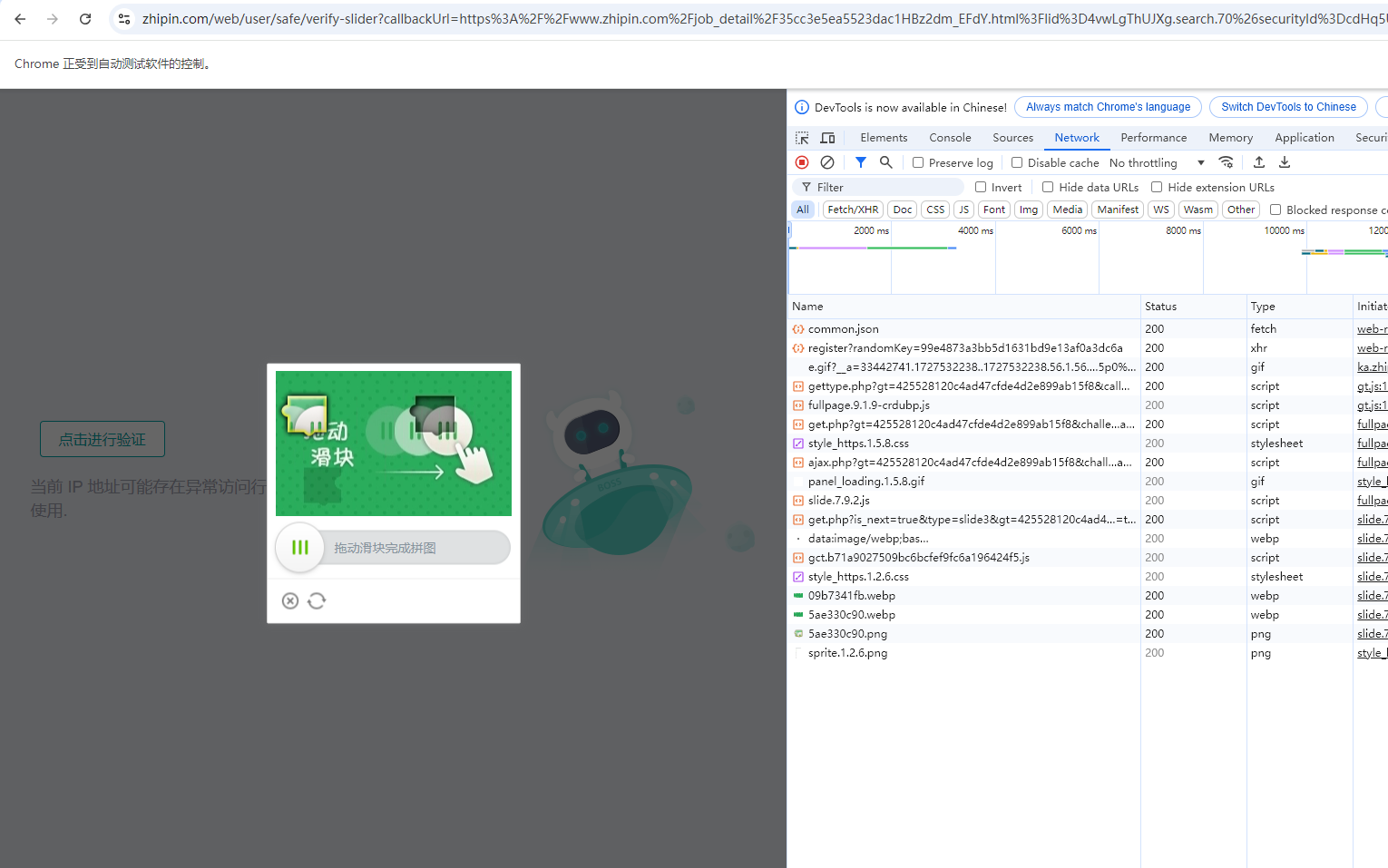
难题 1、被识别出ip存在异常访问行为需要人工验证滑动滑块。
解决方案一 守在电脑前,人力手动验证。
解决方案二 在Downloader动态设置代理ip,按照特性规则每50个请求换一个ip
方案三 滑动验证码识别技术。这种技术通常利用机器学习或深度学习算法来识别滑动验证码的图案和特征,并模拟用户进行滑动操作。然而,由于滑动验证码的复杂性和变化性,识别技术的准确性和稳定性仍然是一个挑战,目前常用的验证码平台是超级鹰:https://www.chaojiying.com/api-45.html,一般用来识别验证码,还不能解决滑块问题。
如果要解决滑块问题,需要定位获取滑块区域,通过算法来解析凹槽的位置,计算得出滑块需要移动的距离,但是该方案难度很高,如果采用第三方解析成本极高,故尽量降低被反扒的可能