Mysql8与5.7的对比 参考资料:
1、MySQL 8.0 新特性解读(上)
2、MySQL 8.0 新特性解读(下)
系统表更换为InnoDB引擎 系统表全部换成事务型的innodb表,默认的MySQL实例将不包含任何MyISAM表,除非手动创建MyISAM表
默认字符集由latin1变为utf8mb4 在8.0版本之前,默认字符集为latin1,utf8指向的是utf8mb3,8.0版本默认字符集为utf8mb4,utf8默认指向的也是utf8mb4
DDL原子化 InnoDB表的DDL支持事务完整性,要么成功要么回滚,将DDL操作回滚日志写入到data dictionary 数据字典表 mysql.innodb_ddl_log 中用于回滚操作,该表是隐藏的表,通过show tables无法看到。通过设置参数,可将ddl操作日志打印输出到mysql错误日志中
DDL秒加列 MySQL 8.0.12 开始,引入新的 DDL 算法 INSTANT ,支持快速加列,但需要注意的是,该版本仅支持将列添加到表的最后一列。
MySQL 8.0.29 开始,INSTANT 作为默认算法(在 8.0.29 之前,默认算法仍为 INPLACE ),支持将新列添加到表中的任何位置,同时支持快速删除列。
此外,INSTANT DDL 也有一个限制:一个表支持 64 次即时更改。如果超过 64 次 INSTANT 变更后的 DDL 需要“重建”表。
在 5.7、8.0 版本上测试对比 DDL 加列效率。
5.7 (5.7.19)上测试如下:
1
2
3
4
5
6
7
8
9
10
11
12
13
14
15
16
17
18
19
20
21
22
23
24
25
26
27
28
29
30
31
32
33
34
35
36
37
38
39
40
41
42
43
44
45
46
47
48
49
50
51
52
53
54
55
56
57
58
# MySQL 5.7 int (11 ) not null auto_increment,int (11 ) default null,int (11 ) default null,int (11 ) default null,if exists idata;create procedure idata () begin declare i int ;set i=1 ;while (i<=1000000 ) do insert into t1 (c1,c2,c3) values (i, i+1 , i+2 ) ;set i=i+1 ;while ;set global sync_binlog=0 ;set global innodb_flush_log_at_trx_commit=2 ;call idata () ;select count (*) from t1 ;1000000 |1 row in set (0.20 sec) alter table t1 add column c4 int (11 ) default null ;0 rows affected (1.63 sec) Records: 0 Duplicates: 0 Warnings: 0 mysql> alter table t1 add column c5 int (11 ) default null ;0 rows affected (1.64 sec) Records: 0 Duplicates: 0 Warnings: 0 0 rows affected (1.75 sec) Records: 0 Duplicates: 0 Warnings: 0 mysql> alter table t1 drop column c5 ;0 rows affected (1.63 sec) Records: 0 Duplicates: 0 Warnings: 0 123456789101112131415161718192021222324252627282930313233343536373839404142434445464748495051525354555657
8.0 (8.0.34)上测试如下:
1
2
3
4
5
6
7
8
9
10
11
12
13
14
15
16
17
18
19
20
21
22
23
24
25
26
27
28
29
30
31
32
33
34
35
36
37
38
39
40
41
42
43
44
45
46
47
48
49
50
51
52
53
54
55
56
57
58
# MySQL 8.0 int (11 ) not null auto_increment,int (11 ) default null,int (11 ) default null,int (11 ) default null,if exists idata8;create procedure idata8 () begin declare i int ;set i=1 ;while (i<=1000000 ) do insert into t8 (c1,c2,c3) values (i, i+1 , i+2 ) ;set i=i+1 ;while ;set global sync_binlog=0 ;set global innodb_flush_log_at_trx_commit=2 ;call idata8 () ;select count (*) from t8 ;1000000 |1 row in set (0.06 sec) alter table t8 add column c4 int (11 ) default null ;0 rows affected, 1 warning (0.01 sec)0 Duplicates: 0 Warnings: 1 alter table t8 add column c5 int (11 ) default null ;0 rows affected, 1 warning (0.01 sec)0 Duplicates: 0 Warnings: 1 0 rows affected (0.01 sec) Records: 0 Duplicates: 0 Warnings: 0 mysql> alter table t8 drop column c5 ;0 rows affected (0.01 sec) Records: 0 Duplicates: 0 Warnings: 0 123456789101112131415161718192021222324252627282930313233343536373839404142434445464748495051525354555657
结果对比:
add/drop column
MySQL 5.7
MySQL 8.0
add column c4
1.63 sec
0.01 sec
add column c5
1.64 sec
0.01 sec
drop column c4
1.75 sec
0.01 sec
drop column c5
1.63 sec
0.01 sec
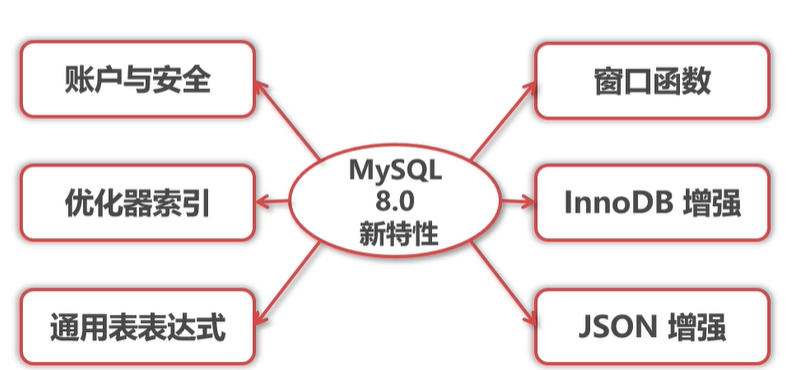
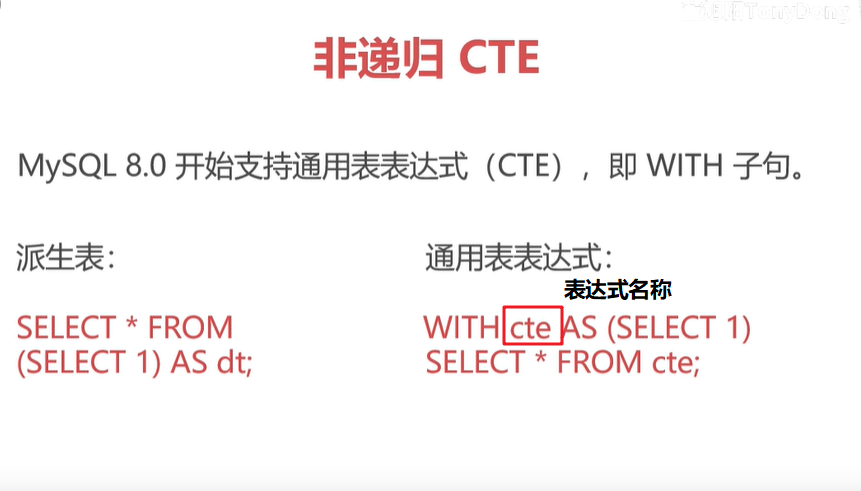
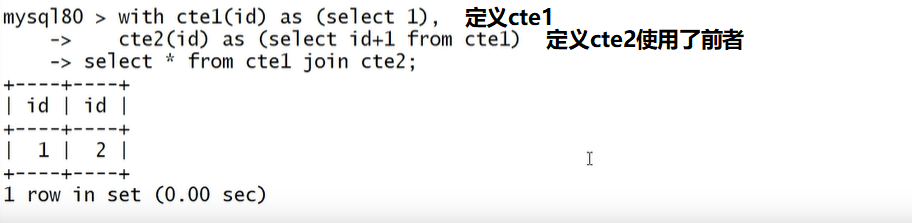
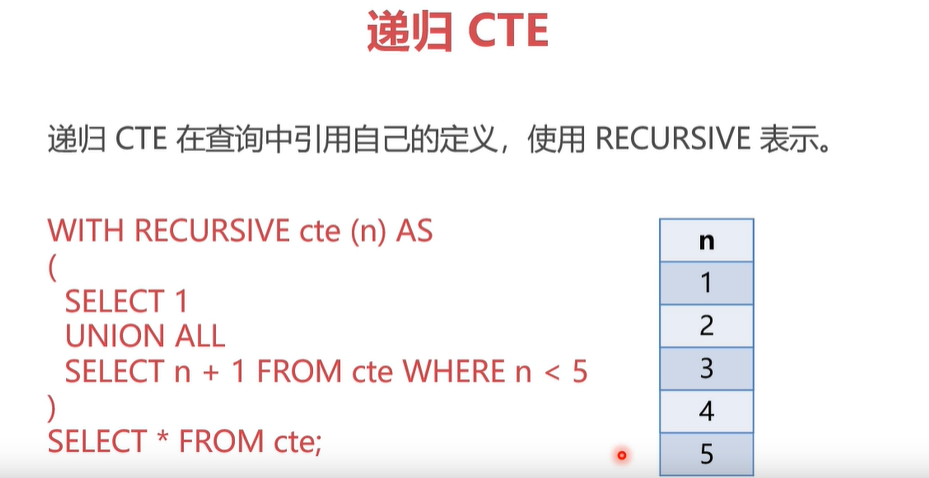
通用表表达式(CTE:Common Table Expression) CTE(Common Table Expression)可以认为是派生表(derived table)或者视图的替代,在一定程度上,CTE简化了复杂的join查询和子查询,另外CTE可以很方便地实现递归查询,提高了SQL的可读性和执行性能。CTE是ANSI SQL 99标准的一部分,在MySQL 8.0.1版本被引入。CTE和派生表最大的区别在于,CTE先定义,后续可以无限嵌套使用前面定义的CTE
cte1(id) 表示这个派生表或者表达式内有一个字段 id
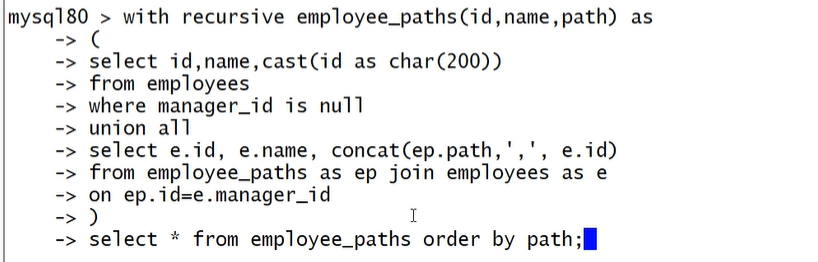
递归表达式 使用递归CET的使用需要注意递归终止条件,mysql默认内置了最大的递归执行深度和执行时间
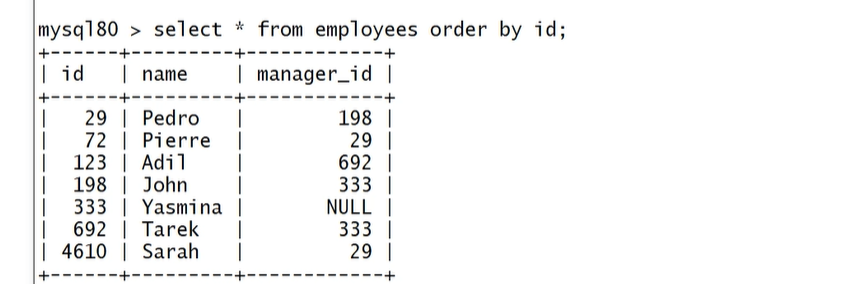
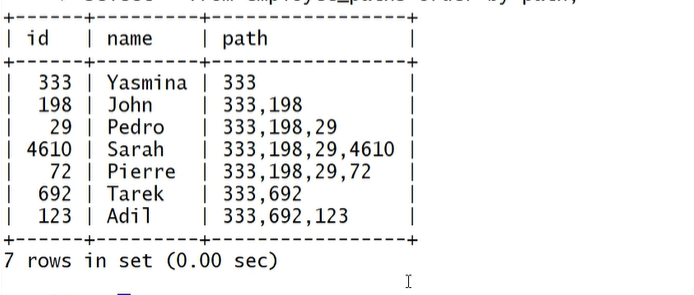
举例:递归查询员工的上级路径
利用CTE实现斐波那契数
1
2
3
4
5
6
with recursive fib (n1, n2) as (
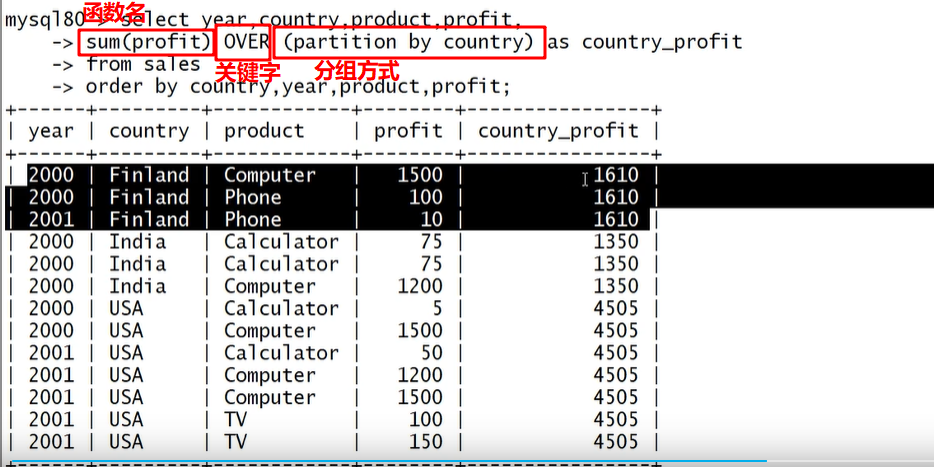
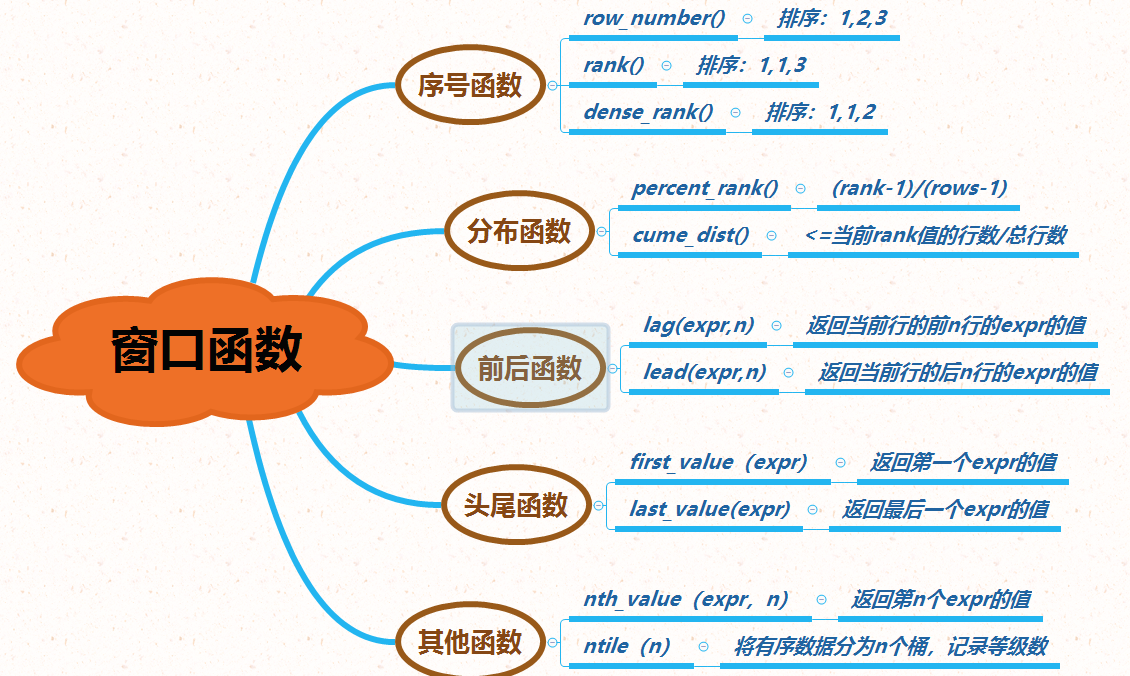
窗口函数(重要) 在每一条记录都执行窗口内的函数。有点类似在select 的查询字段里写子查询,它可以用来实现若干新的查询方式。窗口函数与 SUM()、COUNT() 这种聚合函数类似,但它不会将多行查询结果合并为一行,而是将结果放回多行当中。即窗口函数不需要 GROUP BY,比如
还有其他专用窗口函数,用的比较少。
角色管理 角色可以认为是一些权限的集合,为用户赋予统一的角色,权限的修改直接通过角色来进行,无需为每个用户单独授权。
索引增强(重要) 1、降序索引 2、隐藏索引 3、函数索引 锁定语句选项
自适应参数 将innodb_dedicated_server开启的时候,它可以自动的调整下面这四个参数的值:
innodb_buffer_pool_size 总内存大小
JSON增强 MySQL 8 大幅改进了对 JSON 的支持,添加了基于路径查询参数从 JSON 字段中抽取数据的 JSON_EXTRACT() 函数,以及用于将数据分别组合到 JSON 数组和对象中的 JSON_ARRAYAGG() 和 JSON_OBJECTAGG() 聚合函数。
在主从复制中,新增参数 binlog_row_value_options,控制JSON数据的传输方式,允许对于Json类型部分修改,在binlog中只记录修改的部分,减少json大数据在只有少量修改的情况下,对资源的占用。
join连接增强 已有连接算法:
1、Nested-Loop Join 算法——嵌套循环连接(有索引时快)
2、Block Nested-Loop Join 算法——基于块的嵌套循环连接(无索引时快)
Hash Join Hash Join是针对equal-join场景的优化,基本思想是,将外表数据load到内存,并建立hash表,这样只需要遍历一遍内表,就可以完成join操作,输出匹配的记录。如果数据能全部load到内存当然好,逻辑也简单,一般称这种join为CHJ(Classic Hash Join),之前MariaDB就已经实现了这种HashJoin算法。如果数据不能全部load到内存,就需要分批load进内存,然后分批join。
一般要求join且连接条件是=的场景才能用,且必须全表扫描驱动表和被驱动表完成hash表的构建,并非银弹
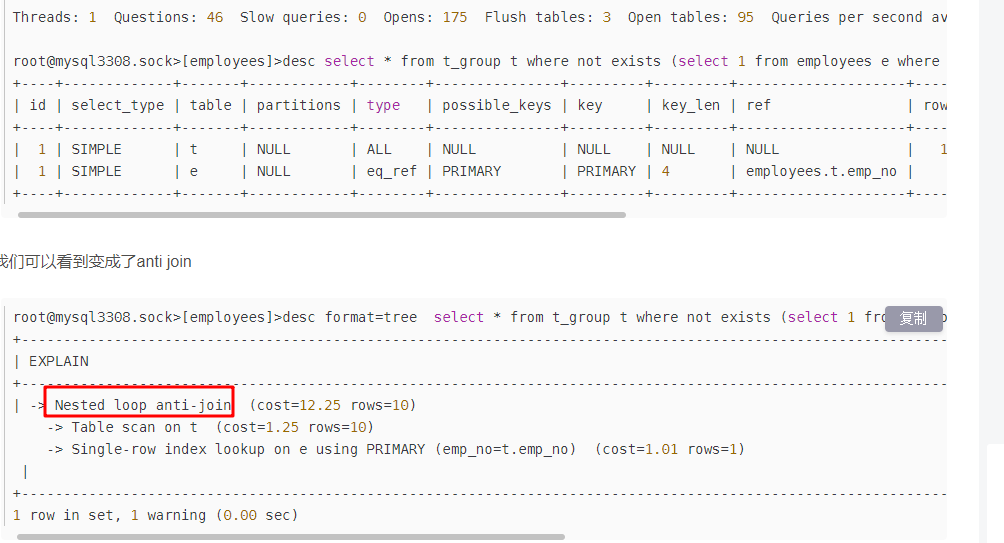
anti join MySQL 8.0.17版本引入了一个anti join的优化,这个优化能够将where条件中的not in(subquery), not exists(subquery),in(subquery) is not true,exists(subquery) is not true,在内部把subquery子查询转化成一个anti join(用explain可以体现),这个优化在某些场景下,能够将性能提升20%左右。
1 select * from t_group t where not exists (select 1 from employees e where e.emp_no = t.emp_no) ;
anti join适用的场景案例通常如下:
找出在集合A且不在集合B中的数据
找出在当前季度里没有购买商品的客户
找出今年没有通过考试的学生
找出过去3年,某个医生的病人中没有进行医学检查的部分

 select for update跳过锁等待